Climbing around the Zephyr device tree with blinky

A simple “blinky” for Zephyr OS on the STM32L432KC Nucleo can be written as follows:

#include <stdio.h>
#include <zephyr/kernel.h>
#include <zephyr/device.h>
#include <zephyr/drivers/gpio.h>

// reference for the STRing macros below:
// https://stackoverflow.com/questions/1562074/how-do-i-show-the-value-of-a-define-at-compile-time
#define XSTR(x) STR(x)
#define STR(x) #x

const struct device *gpio = DEVICE_DT_GET(DT_NODELABEL(gpioa));

int main(void)
{
	printf("Board config = %s\n", CONFIG_BOARD_TARGET);
	printf("Label = %s", XSTR(DT_NODELABEL(gpioa)));
	gpio_pin_configure(gpio,0,GPIO_OUTPUT);	
	while(1)
	{		
		gpio_pin_toggle(gpio,0);				
		printf("Node Label = %s\n", XSTR(DT_NODELABEL(gpioa)));
		printf("GPIO is at %p\n",gpio);
		printf("GPIO device name is %s\n",gpio->name);
		printf("GPIO device config is at %p\n",gpio->config);
		printf("GPIO device api is at %p\n",gpio->api);
		k_msleep(1000);
	}
	return 0;
}

Extra printf’s have been added to try to nail down exactly what is going on with Zephyr devices and device trees. Lets begin by looking at the line that creates our gpio pointer.


const struct device *gpio = DEVICE_DT_GET(DT_NODELABEL(gpioa));

What does this mean?

Well: gpio will be a pointer to a device structure somewhere in the program image (read-only/flash area).

The device structure looks a like this (although shortened a little for brevity, see device.h):

struct device {
	/** Name of the device instance */
	const char *name;
	/** Address of device instance config information */
	const void *config;
	/** Address of the API structure exposed by the device instance */
	const void *api;
	/** Address of the common device state */
	struct device_state *state;
	/** Address of the device instance private data */
	void *data;
	/** Device operations */
	struct device_ops ops;
	/** Device flags */
	device_flags_t flags;
	// some more stuff below omitted.
};

Of greatest significance for this article is the api member of this structure. This is a pointer to a structure that contains the functions we typically use to do GPIO. For GPIO devices this is defined as (gpio.h)

__subsystem struct gpio_driver_api {
	int (*pin_configure)(const struct device *port, gpio_pin_t pin,
			     gpio_flags_t flags);
#ifdef CONFIG_GPIO_GET_CONFIG
	int (*pin_get_config)(const struct device *port, gpio_pin_t pin,
			      gpio_flags_t *flags);
#endif
	int (*port_get_raw)(const struct device *port,
			    gpio_port_value_t *value);
	int (*port_set_masked_raw)(const struct device *port,
				   gpio_port_pins_t mask,
				   gpio_port_value_t value);
	int (*port_set_bits_raw)(const struct device *port,
				 gpio_port_pins_t pins);
	int (*port_clear_bits_raw)(const struct device *port,
				   gpio_port_pins_t pins);
	int (*port_toggle_bits)(const struct device *port,
				gpio_port_pins_t pins);
	int (*pin_interrupt_configure)(const struct device *port,
				       gpio_pin_t pin,
				       enum gpio_int_mode mode,
				       enum gpio_int_trig trig);
	int (*manage_callback)(const struct device *port,
			       struct gpio_callback *cb,
			       bool set);
	uint32_t (*get_pending_int)(const struct device *dev);
#ifdef CONFIG_GPIO_GET_DIRECTION
	int (*port_get_direction)(const struct device *port, gpio_port_pins_t map,
				  gpio_port_pins_t *inputs, gpio_port_pins_t *outputs);
#endif /* CONFIG_GPIO_GET_DIRECTION */
};

So, the gpio pointer variable points to something like this:
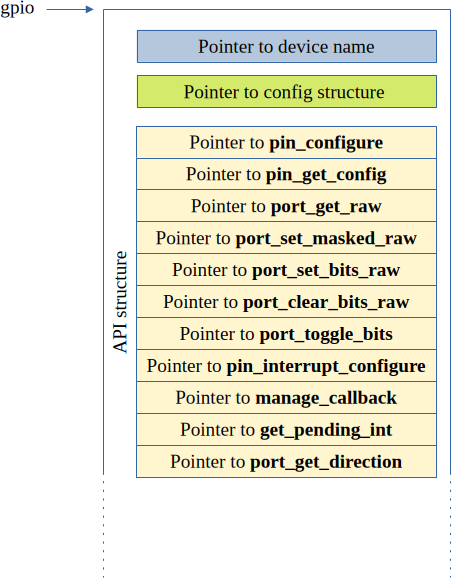
How did this happen? How is it used? How does it map to the correct GPIO functions for a specific microcontroller?

Well, like a lot of Zephyr, the answers to all of these questions lie in macros.

The first of these in the above code is: DEVICE_DT_GET(DT_NODELABEL(gpioa)). The inner macro DT_NODELABEL is pretty simple, it just concatenates two symbols together. It is defined in devicetree.h as follows:

#define DT_NODELABEL(label) DT_CAT(DT_N_NODELABEL_, label)

So, the output from this macro in this case should look like this: DT_N_NODELABEL_gpioa

In devicetree_generated.h this is defined as follows:

#define DT_N_NODELABEL_gpioa      DT_N_S_soc_S_pin_controller_48000000_S_gpio_48000000

It is this symbol that is passed to the outer macro DEVICE_DT_GET. This in turn causes a further cascade of macro expansions

#define DEVICE_DT_GET(node_id) (&DEVICE_DT_NAME_GET(node_id))
#define DEVICE_DT_NAME_GET(node_id) DEVICE_NAME_GET(Z_DEVICE_DT_DEV_ID(node_id))
#define DEVICE_NAME_GET(dev_id) _CONCAT(__device_, dev_id)
#define Z_DEVICE_DT_DEV_ID(node_id) Z_DEVICE_DT_DEP_ORD(node_id)
#define Z_DEVICE_DT_DEP_ORD(node_id) _CONCAT(dts_ord_, DT_DEP_ORD(node_id))
#define DT_DEP_ORD(node_id) DT_CAT(node_id, _ORD)
#define DT_CAT(a1, a2) a1 ## a2

When all of these macros have been expanded, the result is the address of the device structure for the GPIO Port A. All of this macro evaluation happens at compile time so there is no big run-time overhead.

A Zephyr application will have a number of device structures placed in its flash image. Each follows the broad device structure outlined above. To see how our specific device is handled, lets look at the output from the program:

Node Label = DT_N_S_soc_S_pin_controller_48000000_S_gpio_48000000
GPIO is at 0x80060a4
GPIO device name is gpio@48000000
GPIO device config is at 0x8006470
GPIO device api is at 0x8006374

The first line of this is the symbol name produced by the various macros. This symbol evaluates to the memory address 0x80060a4. If we examine search the linker/compiler map file for this address we get:

0x00000000080060a4 __device_dts_ord_76

This tells us that the index number (ordinal) for the GPIOA device is 76. This is confirmed if we look at the devicetree_generated.hs file in the build/zephyr/include/generated/zephyr/ directory (GPIOA is at address 48000000).

/ *
 * Node dependency ordering (ordinal and path):
 *   0   /
 *   1   /aliases
 *   2   /chosen
 *   3   /connector
 *   4   /soc
 *   5   /soc/interrupt-controller@e000e100
 *   6   /clocks
 *   7   /clocks/clk-hsi
 *   8   /clocks/pll
 *   9   /soc/rcc@40021000
 *   10  /soc/adc@50040000
 *   11  /dietemp
 *   12  /memory@20000000
 *   13  /soc/pin-controller@48000000
 *   14  /soc/pin-controller@48000000/i2c1_scl_pb6
 *   15  /soc/pin-controller@48000000/i2c1_sda_pb7
 *   16  /soc/i2c@40005400
 *   17  /smbus1
 *   18  /soc/i2c@40005c00
 *   19  /smbus3
 *   20  /vbat
 *   21  /vref
 *   22  /clocks/clk-hse
 *   23  /clocks/clk-hsi48
 *   24  /clocks/clk-lse
 *   25  /clocks/clk-lsi
 *   26  /clocks/clk-msi
 *   27  /clocks/pllsai1
 *   28  /cpus
 *   29  /cpus/power-states
 *   30  /cpus/power-states/state0
 *   31  /cpus/power-states/state1
 *   32  /cpus/power-states/state2
 *   33  /cpus/cpu@0
 *   34  /soc/pin-controller@48000000/gpio@48000400
 *   35  /leds
 *   36  /leds/led_0
 *   37  /mcos
 *   38  /mcos/mco1
 *   39  /soc/adc@50040100
 *   40  /soc/pin-controller@48000000/can1_rx_pa11
 *   41  /soc/pin-controller@48000000/can1_tx_pa12
 *   42  /soc/can@40006400
 *   43  /soc/dac@40007400
 *   44  /soc/dma@40020000
 *   45  /soc/interrupt-controller@40010400
 *   46  /soc/rng@50060800
 *   47  /soc/dma@40020400
 *   48  /soc/sai1@40015404
 *   49  /soc/sai1@40015424
 *   50  /soc/pin-controller@48000000/usart2_rx_pa15
 *   51  /soc/pin-controller@48000000/usart2_tx_pa2
 *   52  /soc/rcc@40021000/reset-controller
 *   53  /soc/serial@40004400
 *   54  /soc/serial@40008000
 *   55  /soc/pin-controller@48000000/usart1_rx_pa10
 *   56  /soc/pin-controller@48000000/usart1_tx_pa9
 *   57  /soc/serial@40013800
 *   58  /soc/spi@40003c00
 *   59  /soc/pin-controller@48000000/spi1_miso_pa6
 *   60  /soc/pin-controller@48000000/spi1_mosi_pa7
 *   61  /soc/pin-controller@48000000/spi1_nss_pa4
 *   62  /soc/pin-controller@48000000/spi1_sck_pa5
 *   63  /soc/spi@40013000
 *   64  /soc/spi@a0001000
 *   65  /soc/timer@e000e010
 *   66  /soc/timers@40007c00
 *   67  /soc/timers@40009400
 *   68  /usbphy
 *   69  /soc/usb@40006800
 *   70  /soc/watchdog@40002c00
 *   71  /soc/watchdog@40003000
 *   72  /soc/flash-controller@40022000
 *   73  /soc/flash-controller@40022000/flash@8000000
 *   74  /soc/flash-controller@40022000/flash@8000000/partitions
 *   75  /soc/flash-controller@40022000/flash@8000000/partitions/partition@3c000
 *   76  /soc/pin-controller@48000000/gpio@48000000
 *   77  /soc/pin-controller@48000000/gpio@48000800
 *   78  /soc/pin-controller@48000000/gpio@48001c00
 *   79  /soc/power@40007000
 *   80  /soc/power@40007000/wkup-pin@1
 *   81  /soc/power@40007000/wkup-pin@2
 *   82  /soc/power@40007000/wkup-pin@3
 *   83  /soc/power@40007000/wkup-pin@4
 *   84  /soc/power@40007000/wkup-pin@5
 *   85  /soc/rtc@40002800
 *   86  /soc/rtc@40002800/bbram_regs
 *   87  /soc/timers@40000000
 *   88  /soc/timers@40000000/counter
 *   89  /soc/pin-controller@48000000/tim2_ch1_pa0
 *   90  /soc/timers@40000000/pwm
 *   91  /soc/timers@40000000/qdec
 *   92  /soc/timers@40001000
 *   93  /soc/timers@40001000/counter
 *   94  /soc/timers@40001400
 *   95  /soc/timers@40001400/counter
 *   96  /soc/timers@40012c00
 *   97  /soc/timers@40012c00/counter
 *   98  /soc/timers@40012c00/pwm
 *   99  /soc/timers@40012c00/qdec
 *   100 /soc/timers@40014000
 *   101 /soc/timers@40014000/counter
 *   102 /soc/timers@40014000/pwm
 *   103 /soc/timers@40014400
 *   104 /soc/timers@40014400/counter
 *   105 /soc/timers@40014400/pwm
 */

Our printout shows that the device API is at memory address 0x8006374. Again, if we consult the map file (zephyr.map) we find the following:

app_shmem_regions
                0x0000000008006374        0x0
                0x0000000008006374                __app_shmem_regions_start = .
 *(SORT_BY_NAME(SORT_BY_ALIGNMENT(.app_regions.*)))
                0x0000000008006374                __app_shmem_regions_end = .

k_p4wq_initparam_area
                0x0000000008006374        0x0
                0x0000000008006374                _k_p4wq_initparam_list_start = .
 *(SORT_BY_NAME(SORT_BY_ALIGNMENT(._k_p4wq_initparam.static.*)))
                0x0000000008006374                _k_p4wq_initparam_list_end = .

_static_thread_data_area
                0x0000000008006374        0x0
                0x0000000008006374                __static_thread_data_list_start = .
 *(SORT_BY_NAME(SORT_BY_ALIGNMENT(.__static_thread_data.static.*)))
                0x0000000008006374                __static_thread_data_list_end = .

device_deps     0x0000000008006374        0x0
                0x0000000008006374                __device_deps_start = .
 *(SORT_BY_NAME(SORT_BY_ALIGNMENT(.__device_deps_pass2*)))
                0x0000000008006374                __device_deps_end = .

gpio_driver_api_area
                0x0000000008006374       0x24
                0x0000000008006374                _gpio_driver_api_list_start = .
 *(SORT_BY_NAME(SORT_BY_ALIGNMENT(._gpio_driver_api.static.*)))
 ._gpio_driver_api.static.gpio_stm32_driver_
                0x0000000008006374       0x24 zephyr/drivers/gpio/libdrivers__gpio.a(gpio_stm32.c.obj)
                0x0000000008006398                _gpio_driver_api_list_end = .

This tells us that code from gpio_stm32.c is stored at this address. This code implements an STM32L432 specific version of the Zephyr gpio api. Near the bottom of this file a gpio API structure is constructed as follows:

static DEVICE_API(gpio, gpio_stm32_driver) = {
	.pin_configure = gpio_stm32_config,
#if defined(CONFIG_GPIO_GET_CONFIG) && !defined(CONFIG_SOC_SERIES_STM32F1X)
	.pin_get_config = gpio_stm32_get_config,
#endif /* CONFIG_GPIO_GET_CONFIG */
	.port_get_raw = gpio_stm32_port_get_raw,
	.port_set_masked_raw = gpio_stm32_port_set_masked_raw,
	.port_set_bits_raw = gpio_stm32_port_set_bits_raw,
	.port_clear_bits_raw = gpio_stm32_port_clear_bits_raw,
	.port_toggle_bits = gpio_stm32_port_toggle_bits,
	.pin_interrupt_configure = gpio_stm32_pin_interrupt_configure,
	.manage_callback = gpio_stm32_manage_callback,
};

So, when the program executes the line gpio_pin_toggle(gpio,0); The following code is executed (see gpio.h):

static inline int gpio_pin_toggle(const struct device *port, gpio_pin_t pin)
{
	__unused const struct gpio_driver_config *const cfg =
		(const struct gpio_driver_config *)port->config;

	__ASSERT((cfg->port_pin_mask & (gpio_port_pins_t)BIT(pin)) != 0U,
		 "Unsupported pin");

	return gpio_port_toggle_bits(port, (gpio_port_pins_t)BIT(pin));
}

The last line of this function calls on the stm32l432kc version of port_toggle_bits by first looking up the device structure address, then the address of the api structure within it and finally, the .port_toggle_bits (= gpio_stm32_port_toggle_bits) within it. So, at runtime there is a little extra overhead in the sense that a couple of pointers have to be followed but the upside is that it greatly facilitates the writing of device independent code.

Zephyr, BBC Microbit V2 and external flash memory

I was looking for an exercise for students to work on relating to the BBC Microbit V2 and Zephyr when I came across some low cost flash SPI chips on Aliexpress. These are 8 pin DIL chips which work well with breadboards. My goal was to get students to log data using these IC’s and the Zephyr SPI API. A starter example is provided over on git at https://github.com/fduignan/zephyr_bbc_microbit_v2/tree/main/zephyr_3.7.0/mx25l8005. This seems to work well enough for my needs.

While investigating this device I looked at the spi_flash example that comes with Zephyr 3.7. This did not work initially but with the following modifications to app.overlay (to account for wiring and chip ID bytes) the example worked fine with these device

&gpio0 {
        status="okay";
        label="GPIO_0";
};
&gpio1 {
        status="okay";
        label="GPIO_1";
};
&pinctrl {
    /* IMPORTANT!  There should not be a space before the : in the next line (and similar below) */
    spi2_default_alt: spi2_default_alt {
        group1 {
            psels = <NRF_PSEL(SPIM_MOSI,0,13)>,
                    <NRF_PSEL(SPIM_SCK,0,17)>,
                    <NRF_PSEL(SPIM_MISO, 0, 1)>;
                    
        };                       
    };
    spi2_sleep_alt: spi2_sleep_alt {
        group1 {
            psels = <NRF_PSEL(SPIM_MOSI,0,13)>,
                    <NRF_PSEL(SPIM_SCK,0,17)>,
                    <NRF_PSEL(SPIM_MISO, 0, 1)>;
                    
            low-power-enable;
        };
    };
};
&spi2 {
        status = "enabled"; 
        compatible = "nordic,nrf-spim";
    status = "okay";
    pinctrl-0 = <&spi2_default_alt>;
    pinctrl-1 = <&spi2_sleep_alt>;
    cs-gpios = <&gpio1 2 GPIO_ACTIVE_LOW>;
    pinctrl-names = "default", "sleep";
    clock-frequency = <1000000>;
    label = "SPI_FLASH";
    my_chip: mychip@0 {
                compatible = "jedec,spi-nor";
                reg = <0>;
                spi-max-frequency = <1000000>;
                jedec-id = [87 ff ff];
                size = <0x1000000>;
                
        };
};

The BBC Microbit V2 and OpenThread

This is an initial posting about early progress I have made with the BBC Microbit V2 and OpenThread. Nordic Semiconductor has posted some good example code for the NRF52840 dongle and development kit. These examples involve the Zephyr operating system and work pretty well. In particular, the echo server example is easy enough to build and deploy on an NRF52840 dongle or XIAO NRF52840 board. This can then be controlled over IPv6 as I mentioned in a previous post.

Compiling the same code for the BBC Microbit V2 initially did not work. Setting the board type to nrf52833dk_nrf52833 (the same IC that is in the Microbit) allows compilation to work but flash programming the device is difficult. I was looking for a way to do this by setting the board type to bbc_microbit_v2. The code would build, flash but not run. It seems that the configuration files for the Microbit V2 in Zephyr do not enable the 802.15.4 radio required by the Thread network. I discovered that this could be enabled by adding an app.overlay file to the project root directory with the following contents:

/ {
	chosen {
		
		zephyr,ieee802154 = &ieee802154;
	};
};
&ieee802154 {
	status = "okay";
};

Compiling, flashing and running the echo_server example worked after adding this.

The next part of the journey was to add some Microbit specific I/O. I thought it would be nice to control the onboard LED matrix over the network. The echo_server code is a little complex and perhaps daunting for people starting out. I modified it a little so that a beginner could concentrate on a single C file which would handle UDP packets and I/O. This file is called usb_processor.c and is shown below:

#include <stdint.h>
#include <zephyr/logging/log.h>
#include <zephyr/kernel.h>
#include <errno.h>
#include <stdio.h>
#include <zephyr/net/socket.h>
#include <zephyr/drivers/gpio.h>
#include "matrix.h"

int initIO()
{
    int ret=0;
    ret=matrix_begin();
    return ret;
}
void udp_send_receive(uint8_t *buffer, uint32_t len)
{
    // Message is assumed to be at least 4 bytes long (a kluge for now!)
    // print the message out for debugging purposes
    if (len)
    {
        int index=0;
        while(index < len)
        {
            printk("%x ",buffer[index]);
            index++;
        }
    }
    matrix_put_pattern(buffer[0],buffer[1]);
    // pass some data back to the sender
    buffer[2]='a';
    buffer[3]='b';
}

The function initIO configures I/O devices (the LED matrix in this case – see matrix.c in the github link provided below). The function udp_send_receive is called when a UDP packet is received. In this primitive example, the first two bytes are treated as row and column bit masks for the LED matrix. The values are passed on to matrix_put_pattern. Just before returning, two characters are placed in the return packet just to verify that communications is bidirectional.

The NodeJS code that sends data to the Microbit is shown below:


var udp=require('dgram');
// -------------------- udp client ----------------

var buffer = require('buffer');

// creating a client socket
var client = udp.createSocket('udp6');

//buffer msg

client.on('message',function(msg,info){
  console.log('Data received from server : ' + msg.toString());
  console.log('Received %d bytes from %s:%d\n',msg.length, info.address, info.port);
});
//sending msg
    
var data = Buffer.from([0x1f,0x0,0x32,0x33]);

client.send(data,4242,'fd96:5e1e:4749:1:1fdb:ff05:1113:b755',function(error){
    if(error){
        client.close();
    } else{
        console.log('Data sent !!!');
    }
});

The IPv6 address of the Microbit has been hard-coded for now (working on network discovery next). The payload received by the Microbit is prepared in the data Buffer object. The first byte selects which rows are to be activated in the LED matrix (there are 5 of them). The second byte is selects which columns are active. In the case of columns, a ‘0’ in a particular bit activates that column.

Code (such as it is) is over here on github

A closing note for now: This is tricky stuff to set up and get working. I should probably put together a post that details the entire process of setting this up and running. In the meantime, if you have questions send me an email

OpenThread experiments

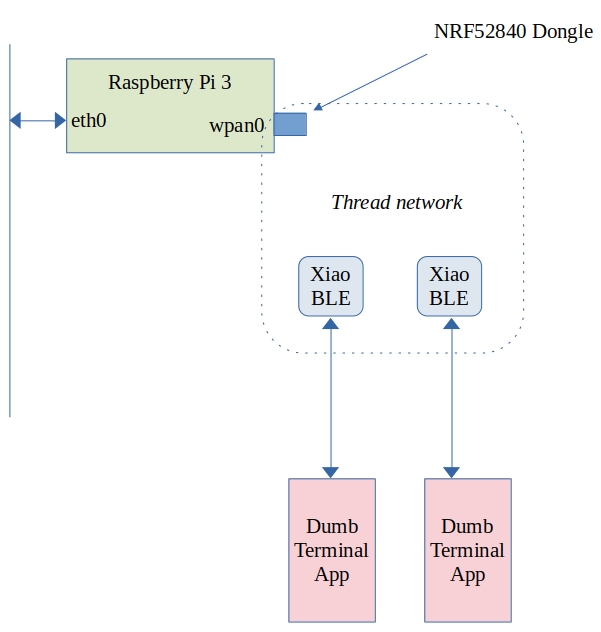
I have been experimenting with OpenThread using a RaspberryPi with Nordic 52840 Dongle and a pair of Xiao BLE modules.

The topology looks like this:

What does this let me do? As it stands I can ping either of the Xiao BLE devices from any computer on my network using IPv6. The RaspberryPi+NRF52840 dongle behave as a border router and bridges between the OpenThread/6LowPan network and the wired Ethernet.

This has not been entirely straightforward so far. The XIAO-BLE devices are running Zephyr’s sample echo_server built with this command line:

west build -b xiao_ble echo_server -- -DCONF_FILE="prj.conf overlay-ot.conf" 

Prior to this, the project configuration file (prj.conf) was modified as follows:

# Generic networking options
CONFIG_NETWORKING=y
CONFIG_NET_UDP=y
CONFIG_NET_TCP=y
CONFIG_NET_IPV6=y
CONFIG_NET_IPV4=y
CONFIG_NET_SOCKETS=y
CONFIG_NET_SOCKETS_POSIX_NAMES=y
CONFIG_POSIX_MAX_FDS=6
CONFIG_NET_CONNECTION_MANAGER=y

# Kernel options
CONFIG_MAIN_STACK_SIZE=2048
CONFIG_ENTROPY_GENERATOR=y
CONFIG_TEST_RANDOM_GENERATOR=y
CONFIG_INIT_STACKS=y

# Logging
CONFIG_NET_LOG=y
CONFIG_LOG=y
CONFIG_NET_STATISTICS=y
CONFIG_PRINTK=y

# Network buffers
CONFIG_NET_PKT_RX_COUNT=16
CONFIG_NET_PKT_TX_COUNT=16
CONFIG_NET_BUF_RX_COUNT=64
CONFIG_NET_BUF_TX_COUNT=64
CONFIG_NET_CONTEXT_NET_PKT_POOL=y

# IP address options
CONFIG_NET_IF_UNICAST_IPV6_ADDR_COUNT=3
CONFIG_NET_IF_MCAST_IPV6_ADDR_COUNT=4
CONFIG_NET_MAX_CONTEXTS=10

# Network shell
CONFIG_NET_SHELL=y
CONFIG_SHELL=y

# Network application options and configuration
CONFIG_NET_CONFIG_SETTINGS=y
CONFIG_NET_CONFIG_NEED_IPV6=y
#CONFIG_NET_CONFIG_MY_IPV6_ADDR="2001:db8::3"
#CONFIG_NET_CONFIG_PEER_IPV6_ADDR="2001:db8::1"
#CONFIG_NET_CONFIG_NEED_IPV4=y
#CONFIG_NET_CONFIG_MY_IPV4_ADDR="192.0.2.1"
#CONFIG_NET_CONFIG_PEER_IPV4_ADDR="192.0.2.2"

# Number of socket descriptors might need adjusting
# if there are more than 1 handlers defined.
CONFIG_POSIX_MAX_FDS=12

# How many client can connect to echo-server simultaneously
CONFIG_NET_SAMPLE_NUM_HANDLERS=1

CONFIG_OPENTHREAD_DHCP6_SERVER=y
CONFIG_OPENTHREAD_SLAAC=y
CONFIG_NET_IF_UNICAST_IPV6_ADDR_COUNT=6
# need to add this so that the module can join the thread network
CONFIG_OPENTHREAD_JOINER=y

This creates a file called Zephyr.uf2 which is copied to the XIAO devices when they are in UF2 bootloader mode (press the button on them twice).

The NRF52840 dongle code was obtained from https://github.com/openthread/ot-nrf528xx/blob/main/src/nrf52840/README.md

This was compiled as follows:

./script/build nrf52840 USB_trans -DOT_BOOTLOADER=USB
arm-none-eabi-objcopy -O ihex build/bin/ot-rcp ot-rcp.hex
nrfutil pkg generate --hw-version 52 --sd-req=0x00 --application ot-rcp.hex --application-version 1 ot-rcp.zip
nrfutil dfu usb-serial -pkg ot-rcp.zip -p /dev/ttyACM0

(The NRF52840 dongle has to be in DFU mode for the last line to work)

Finally, the raspberry pi 3 had to be set up. This is running Raspbian and the OpenThread border router services were obtained by cloning https://github.com/openthread/ot-br-posix, building and compiling (and much fiddling about!).

Where to from here? Well, the whole point of this experiment is to compare the BLE/GATT/GAP approach to IoT to one using IPv6 and “traditional” network function calls.

Missing interrupts with Zephyr OS on the Microbit V2.21

The case of the missing interrupts

Recently, we asked our students to buy BBC Microbits for our Internet of Things module. Most of them received version 2.0 of the board. Some however received version 2.21. The main difference between the boards is the USB interface MCU. Version 2.00 used an NXP MKL27Z256VFM4. The 2.21 version changed this to a Nordic Semiconductor NRF52820 device. In most cases, users will not notice the difference between the two boards. However, if you are programming hardware registers directly there are some differences. We use Zephyr OS in our IoT module and work at the hardware level so, for us, this showed up as missing interrupts from the LSM303 Accelerometer/Magnetometer.

Our sample code programs the LSM303 as a step counter. When the accelerometer experiences low acceleration in all 3 axes (i.e. in freefall) it outputs an interrupt signal. This signal pulls the I2C_INT_INT line low (falling edge interrupt trigger). On Version 2.00 boards this worked fine, not so on V2.21 boards. The problem turned out to be that the interface MCU was holding the I2C_INT_INT line low permanently which prevented falling edge interrupts.

The solution

I contacted microbit.org and quickly received a response from Carlos. He pointed me at this site which documents the I2C interface protocol implemented by the interface MCU. This looks quite interesting and will need further exploration at a later date. Carlos suggest that I program the target to perform a dummy read of the interface MCU over the I2C bus. I tried this and it almost solved the problem. Just after programming or after pressing the reset button, the Microbit processed interrupts correctly. After a power on reset however interrupts did not take place. Again Carlos came to the rescue and suggested that I pause the target boot for 1 second before performing the dummy read. This time allows the interface MCU to complete boot up before the dummy read. The result? Interrupts were processed correctly!

The initialization code for the LSM303 motion sensor was modified as shown below:

static const struct device *i2c;
int lsm303_ll_begin()
{
	int nack;
	uint8_t device_id;
	// Set up the I2C interface
	i2c = device_get_binding("I2C_1");
	if (i2c==NULL)
	{
		printk("Error acquiring i2c1 interface\n");
		return -1;
	}	
	// Fix for version 2.21 of the Microbit.  
	// This code resets the I2C_INT_INT signal coming out of the interface IC (DAPLink)
	// There is an acknowledged bug in the firmware for this IC which leave the interrupt
	// line asserted under certain conditions.  This prevents the LSM303 from raising interrupts
	// A dummy read of the interface IC (I2C address 0x70) deasserts this signal
	// Thanks to Carlos in microbit for this help.
	k_msleep(1000); // allow interface MCU complete booting before dummy read
	uint8_t dummy_value[5];
	nack=i2c_read(i2c,dummy_value,1,0x70);	
	printk("nack=%x\n",nack);
	
	
	// Check to make sure the device is present by reading the WHO_AM_I register
	nack = lsm303_ll_readRegister(0x0f,&device_id);
	if (nack != 0)
	{
		printk("Error finding LSM303 on the I2C bus\n");
		return -2;
	}
	else	
	{
		printk("Found LSM303.  WHO_AM_I = %d\n",device_id);
	}
	lsm303_ll_writeRegister(0x20,0x77); //wake up LSM303 (max speed, all accel channels)
	lsm303_ll_writeRegister(0x23,0x08); //enable  high resolution mode +/- 2g
	
	return 0;
}

Thanks to Carlos Pereira Atencio from the Microbit foundation for lots of help solving this problem.

Full schematics are available here:https://tech.microbit.org/hardware/schematic/

Moving a BLE application from Zephyr 2.6.0 to version 3.1.0

I have been using the Microbit V2 as a BLE development tool with our engineering students. Part of this involves looking below the covers at what is happening on the I2C bus. Students interact with the built-in accelerometer using I2C reads and writes (i.e. not using Zephyr’s high level driver). Version 2.6.0 of Zephyr allowed us to do this without many problems. Students were given a basic BLE step counter application which they analysed and extended in a practical session. Zephyr OS is under constant development of course and it has moved on to version 3.1 over the past few months. Naturally this broke all of my sample code 🙂

So what’s changed. Well, first of all, the Zephyr include path has gone from

#include <bluetooth/bluetooth.h>

to

#include <zephyr/bluetooth/bluetooth.h>

Now there is a project configuration variable that allows legacy include directory names but I decided that I would go in and make the changes to the various source files. This turned out to be the easiest change to make.

The next hurdle turned out to be the PINCTRL system built in to Device Tree. This is something I avoided in Zephyr 2.6 as it has a big enough learning curve, lacks some documentation and is very different to the bare-metal microcontroller way of managing I/O pins. The approach taken was instead to assign pins to functions in the app.overlay file as follows:


&i2c1 { 
	compatible = "nordic,nrf-twim"; 
	status = "okay"; 
	sda-pin = < 16 >;// P0.16 = I2C_INT_SDA 
	scl-pin = < 8 >; // P0.8 = I2C_INT_SCL 
}; 
&spi2 { 
	compatible = "nordic,nrf-spi"; 
	status = "okay"; 
	sck-pin = <17>; 
	mosi-pin = <13>; 
/* Redirecting MISO to a pin that is not connected on the microbit v2 board */ 
	miso-pin = <27>; 
	clock-frequency = <1000000>; 
}; 
&adc { 
	status = "okay"; 
}; 
&pwm0 { 
	status = "okay"; 
// P0.3 is labelled RING1 on the microbit. 
	ch0-pin = <3>; 
};


Attempting to do this with version 3.1 results in lots of errors of the following form:

static assertion failed: “/soc/spi@40023000 has legacy *-pin properties defined although PINCTRL is enabled

Why does this happen? When I build the code I use the following command:

west build -b bbc_microbit_v2 ble_stepcount -p

This uses the board definitions for the bbc_microbit_v2 device as defined in the directory zephyr/boards/arm/bbc_microbit_v2/

This directory contains a number of files that define the device tree and various project build options. The result is that the build system requires all pin definitions to be carried out using the PINCTRL mechanism. So what’s different? Here’s the PINCTRL version of my app.overlay file.

&pinctrl {
   /* IMPORTANT!  There should not be a space before the : in the next line (and 	similar below) */
    spi2_default_alt: spi2_default_alt {
        group1 {
            psels = <NRF_PSEL(SPIM_MOSI,0,17)>,
                    <NRF_PSEL(SPIM_SCK,0,13)>;
        };
        group2 {
        	psels = <NRF_PSEL(SPIM_MISO, 0, 27)>;
	      bias-pull-down;
        };
        
    };
    spi2_sleep_alt: spi2_sleep_alt {
        group1 {
            psels = <NRF_PSEL(SPIM_MOSI,0,17)>,
                    <NRF_PSEL(SPIM_SCK,0,13)>,
                    <NRF_PSEL(SPIM_MISO, 0, 27)>;
            low-power-enable;
        };
    };
    i2c1_default_alt: i2c1_default_alt {
        group1 {
            psels = <NRF_PSEL(TWIM_SDA,0,16)>,
                    <NRF_PSEL(TWIM_SCL,0,8)>;
            bias-pull-up;
        };
    };
    i2c1_sleep_alt: i2c1_sleep_alt {
        group1 {
            psels = <NRF_PSEL(TWIM_SDA,0,16)>,
                    <NRF_PSEL(TWIM_SCL,0,8)>;
            low-power-enable;
        };
    };
 };
 
 &spi2 {
    compatible = "nordic,nrf-spi";
    status = "okay";
    pinctrl-0 = <&spi2_default_alt>;
    pinctrl-1 = <&spi2_sleep_alt>;
    pinctrl-names = "default", "sleep";

    clock-frequency = <1000000>;
};
&i2c1 {
	compatible = "nordic,nrf-twim";
	status = "okay";
	pinctrl-0 = <&i2c1_default_alt>;
	pinctrl-1 = <&i2c1_sleep_alt>;
	pinctrl-names = "default", "sleep";
	label = "I2C_1";
};
&i2c0 {
    status="disabled";
};
&gpio0 {
    status="okay";
    label="GPIO_0";
};
&adc {
        status = "okay";
};
&pwm0 {
        status = "okay";
// P0.3 is labelled RING1 on the microbit. 
        ch0-pin = <3>; 
};


As you can see, there are lots of changes. The pinctrl section is new. This section allows us to redefine the pins used by the microcontroller peripherals spi2 and i2c1. We write definitions for each of these for the default powered up state and for the sleep state. (Definitions for sleep state are not required if you disable power management in the project configuration file). States contain one or more groups of pin definitions. These groups allocate actual pin numbers to peripheral functions and can set group properties such as whether there will be pull-up resistors etc. Pin assignment for SPI2 is follows:

psels = <NRF_PSEL(SPIM_MOSI,0,17)>,
<NRF_PSEL(SPIM_SCK,0,13)>,
<NRF_PSEL(SPIM_MISO, 0, 27)>;

This states that MOSI is on GPIO0, bit 17, SCK GPIO0, bit 13 etc. The trickiest part of this is finding out what are the correct names of the pins e.g. SPIM_MOSI, TWIM_SDA and so on. I found them in

zephyr/boards/arm/bbc_microbit_v2/bbc_microbit_v2-pinctrl.dtsi and

zephyr/boards/arm/nrf52833dk_nrf52833/nrf52833dk_nrf52833-pinctrl.dtsi

Having defined the pin assignments the next sections (&spi2, &i2c1) allow you to apply them to the hardware in this project. In the case of spi2, the pinctrl settings for state 0 (default) are remapped to spi2_default_alt with this line:

pinctrl-0 = <&spi2_default_alt>;

The configuration for sleep mode are configured by assigning a value to pinctrl-1 as follows:

pinctrl-1 = <&i2c1_sleep_alt>;

In my C code I had acquired a device handle I2C1 and GPIO0 using the names “I2C_1” and “GPIO_0” respectively. This did not work with Zephyr 3.1 but inserting label directives as shown above fixed this error.

At this point, the code would build and appear to work with one exception: Bluetooth notify failed to work correctly. I saw lots of warnings of the following form in a serial terminal monitoring the microbit:

<wrn> Device is not subscribed to characteristic

This happened when the bt_gatt_notify function was called in response to a change in step count value. Fixing this error took a while! The original BLE characteristic and service definition was as follows:

#define BT_GATT_CHAR1 \ BT_GATT_CHARACTERISTIC(&stepcount_id.uuid,BT_GATT_CHRC_READ | \  BT_GATT_CHRC_WRITE |  BT_GATT_CHRC_NOTIFY, 	BT_GATT_PERM_READ | \ BT_GATT_PERM_WRITE, read_stepcount, write_stepcount, &stepcount_value)


// ********************[ Service definition ]********************
#define BT_UUID_CUSTOM_SERVICE_VAL	\
	BT_UUID_128_ENCODE(1, 2, 3, 4, (uint64_t)0)
static struct bt_uuid_128 my_service_uuid = BT_UUID_INIT_128( BT_UUID_CUSTOM_SERVICE_VAL);

BT_GATT_SERVICE_DEFINE(my_service_svc,
	BT_GATT_PRIMARY_SERVICE(&my_service_uuid),
		BT_GATT_CHAR1
);

The new definition and additional code is as follows:

#define BT_GATT_CHAR1 BT_GATT_CHARACTERISTIC(&stepcount_id.uuid,BT_GATT_CHRC_READ | \ BT_GATT_CHRC_WRITE |  BT_GATT_CHRC_NOTIFY | BT_GATT_CCC_NOTIFY, \ BT_GATT_PERM_READ | BT_GATT_PERM_WRITE, read_stepcount, write_stepcount, \ &stepcount_value)

static void step_changed(const struct bt_gatt_attr *attr,
                                 uint16_t value)
{   if (value==BT_GATT_CCC_NOTIFY)
    {
       printk("Subscribed\n");
       Subscribed = 1;
    }
    else
    {
        printk("Not Subscribed\n");
        Subscribed = 0;
    }
}


// ********************[ Service definition ]********************
#define BT_UUID_CUSTOM_SERVICE_VAL	BT_UUID_128_ENCODE(1, 2, 3, 4, (uint64_t)0)
static struct bt_uuid_128 my_service_uuid = BT_UUID_INIT_128( BT_UUID_CUSTOM_SERVICE_VAL);
BT_GATT_SERVICE_DEFINE(my_service_svc,
	BT_GATT_PRIMARY_SERVICE(&my_service_uuid),
		BT_GATT_CHAR1,
        BT_GATT_CCC(step_changed,BT_GATT_PERM_READ | BT_GATT_PERM_WRITE)

Changes are highlighted in bold. What are the changes all about?

BT_GATT_CCC_NOTIFY : configures the attribute to send notifications if there are changes to attribute values.

Function step_changed : This function is a callback that is activated when there is a change to the subscription status of a BLE client. It updates a global variable called Subscribed which is used to later to determine whether a ble_gatt_notify event is sent.

BLE_GATT_CCC : This macro defines what looks like a new attribute of the characteristic BT_GAT_CHAR1 (the step counter). This attribute can be read and written by the client device to enable or disable notifications. When a BLE client subscribes or unsubscribes from notifications for this characteristic, the function step_changed is called (CCC stands for Client Characteristic Configuration).

All of the above took quite some time and I hope the description is of some help to other lost souls. Code is available over here on github. This will grow as a port the rest of my examples.

Dublin Maker 2022 happened!

Dublin Maker 2022 took place on the 23rd of July in Merrion Square in Dublin. Despite some initial rain it turned out to be a great day out (as usual). Lots of photos of the event can be seen here:

https://photos.app.goo.gl/8twxRULEAhV5F2vp6

Thanks to all the committee for organizing this great event.

The DMB 2022 badge runs Zephyr!

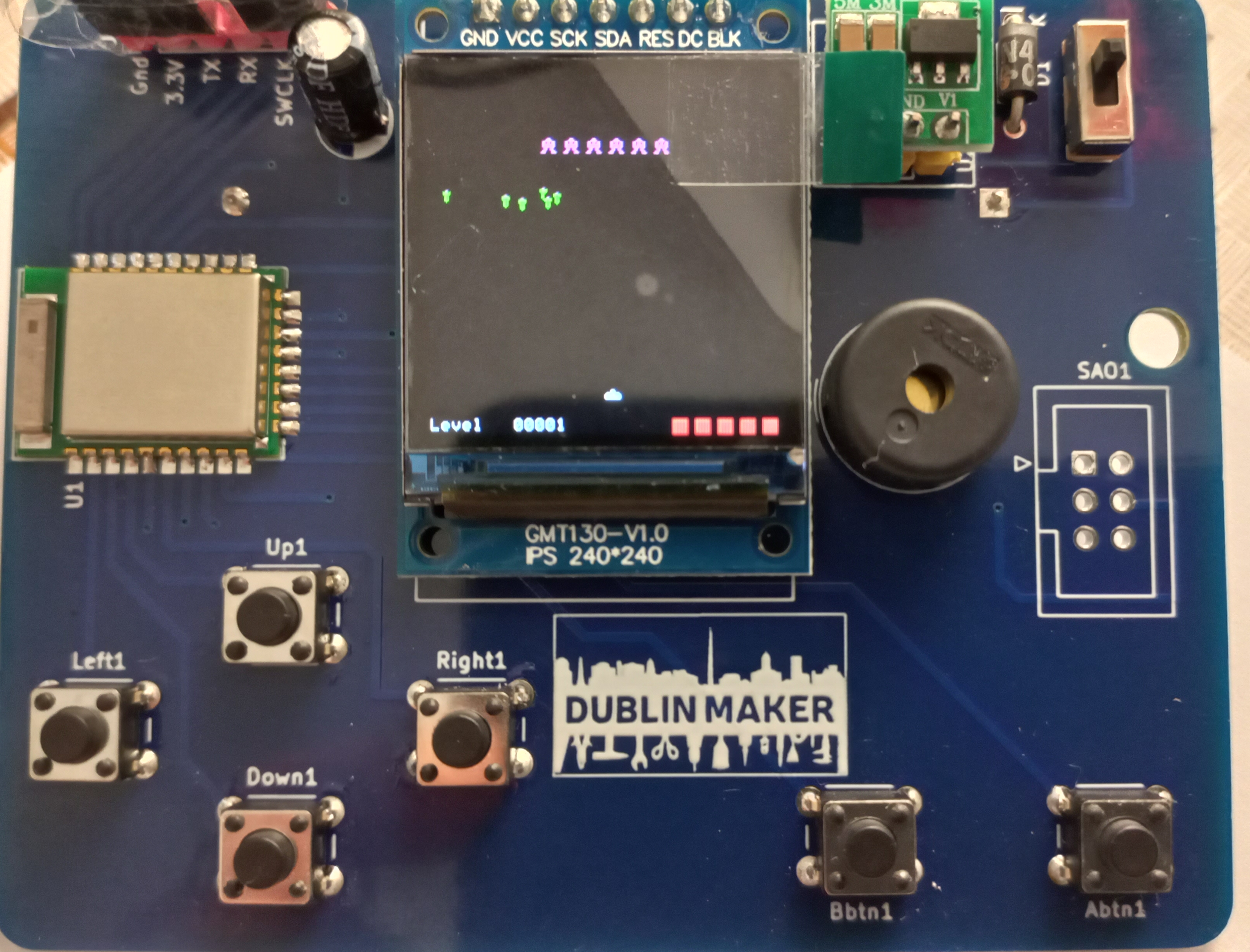
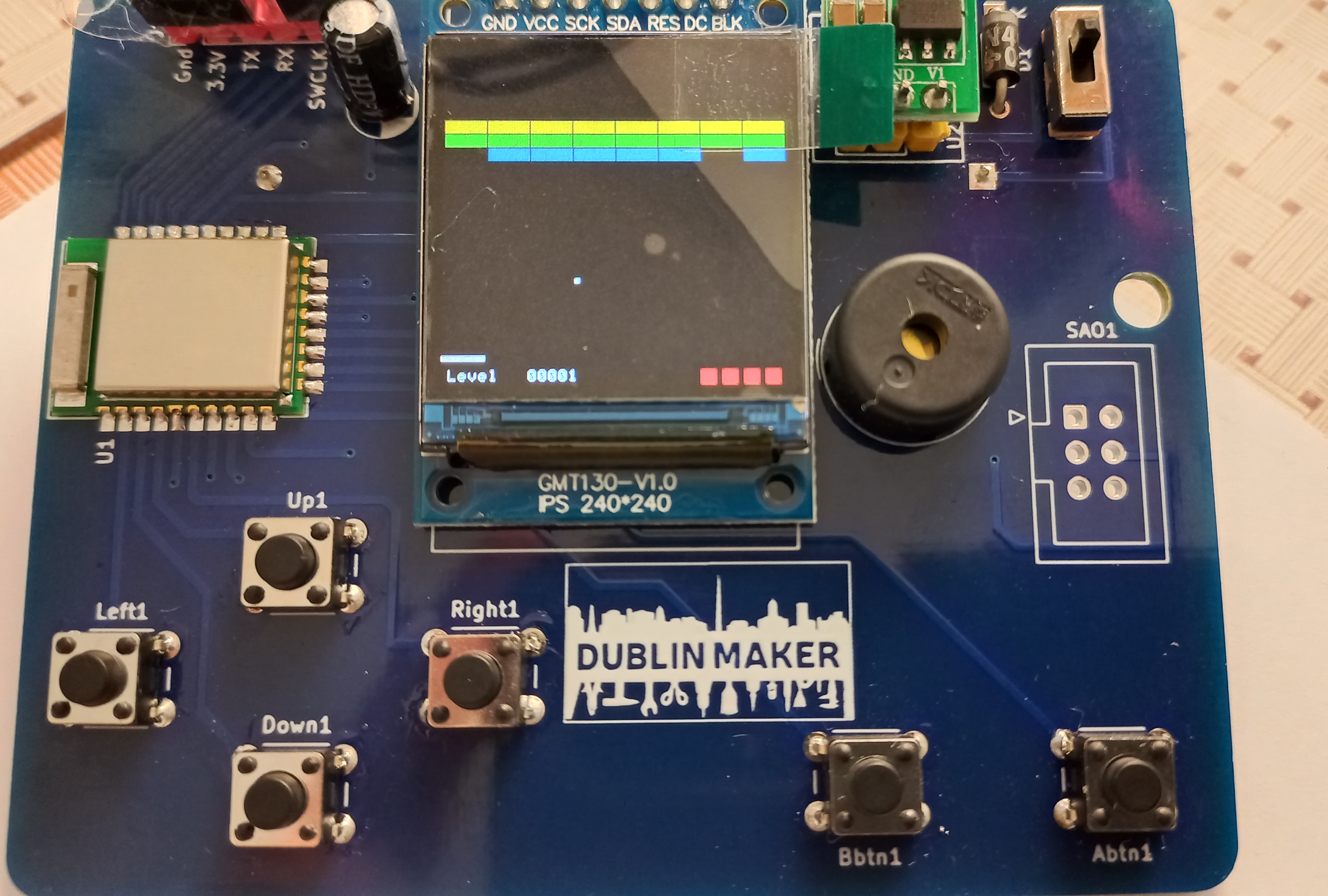
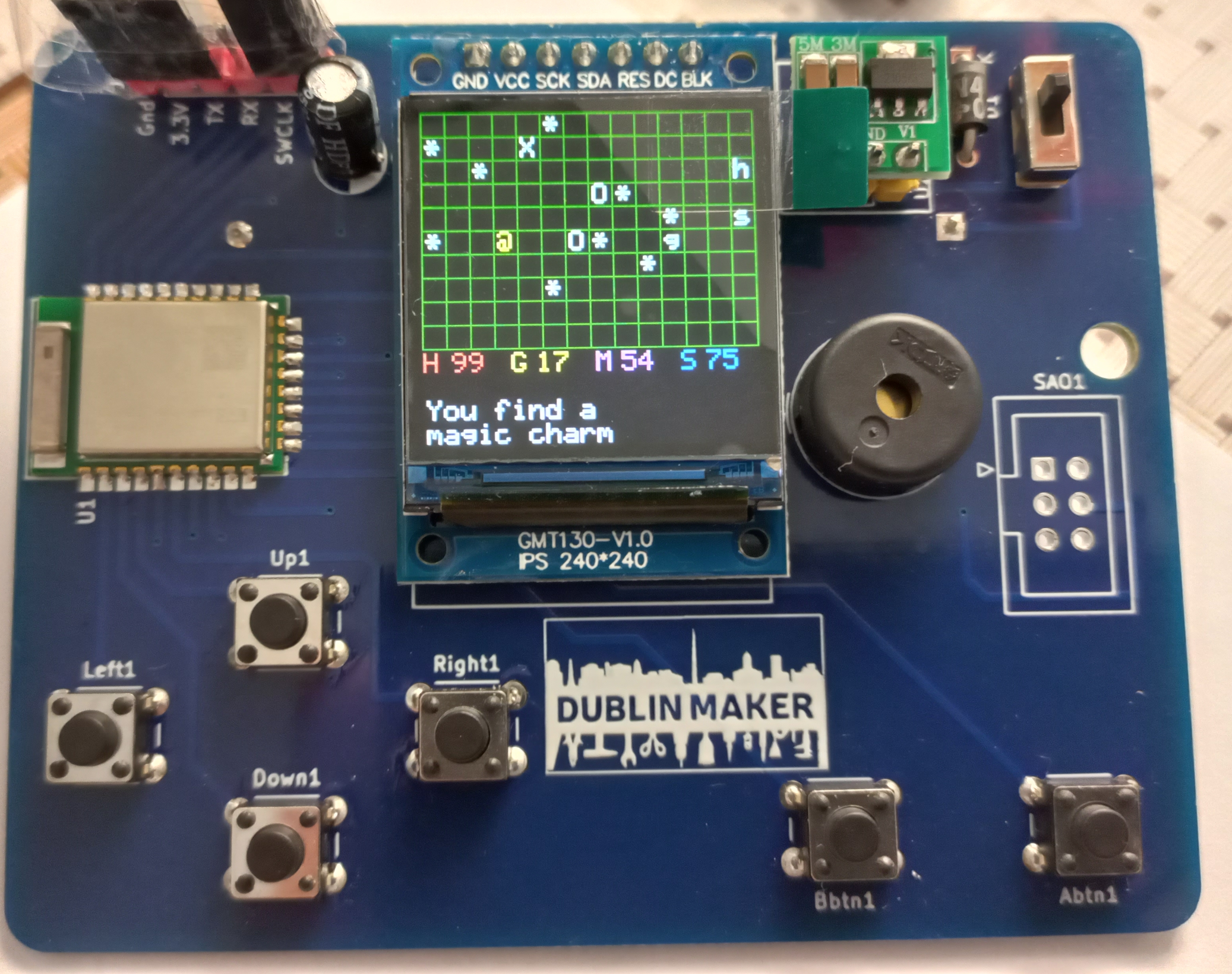
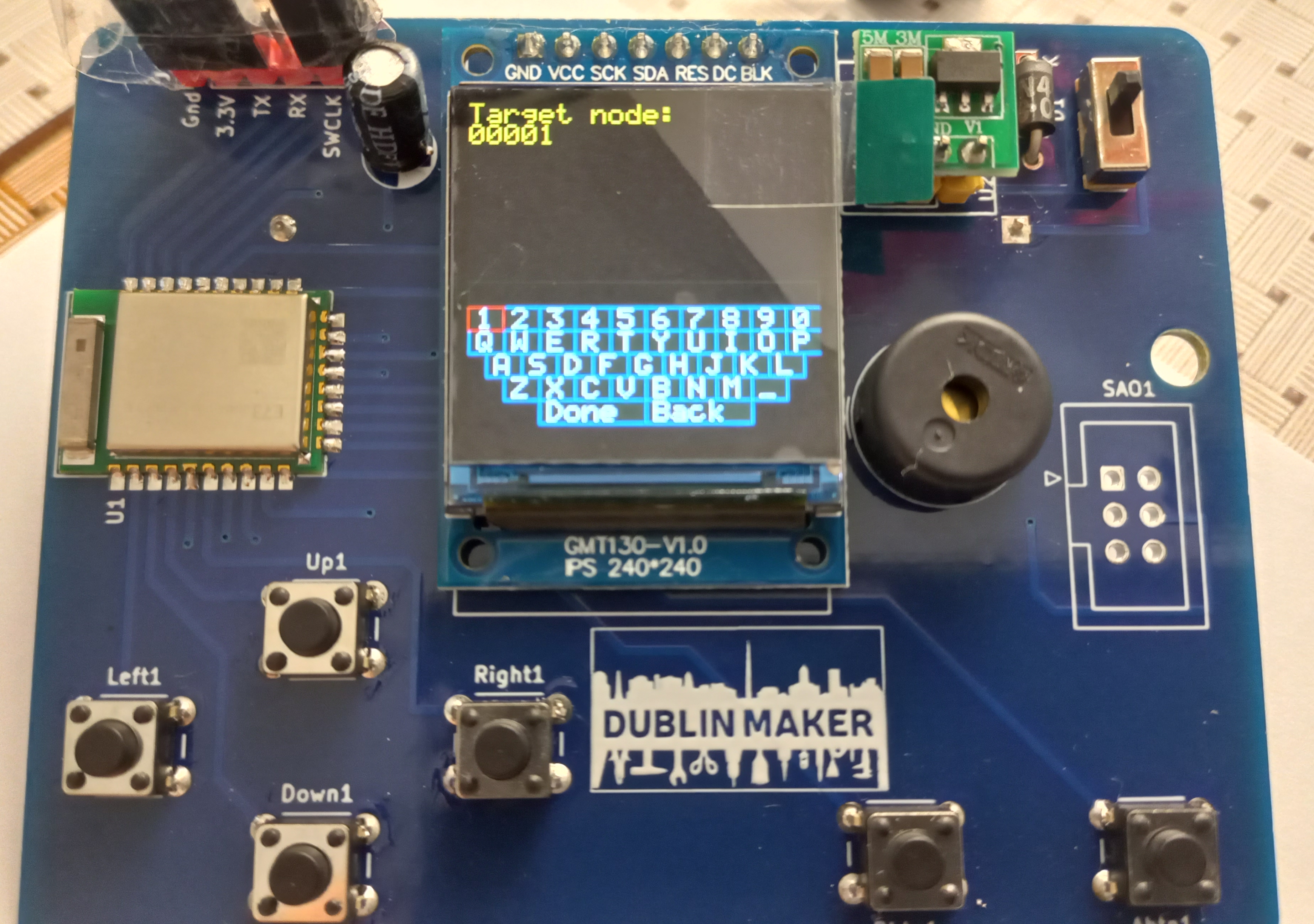
I finally finished (sort of) the code for the badge. It contains a number of games including:

Galaga

Galaga

Brici (like breakout)

Brici

An adventure game called Microrealms

Microrealms

A version of the Battleship game for two players (we did this on paper when were in school)

And a communications “applet”

This uses BLE Mesh which is made possible by Zepher OS (version 2.6.0). When the badge is idle it shows the Dublin Maker logo which includes a city skyline containing “The spire”. This pretends to be a radio antenna as shown below 🙂

Code for all of this is over on github here https://github.com/fduignan/nrf52833

This will not be the end of the road for this badge. I plan to add additional software and upgrade to a more recent version of Zephyr although I will have to learn more about the PINCTRL mechanism first.

Badge board bring-up

The badge PCB’s arrived! With more than a little trepidation parts were gradually added (checking for the magic smoke at each step) and in the end, everything worked!

Next steps are to make a couple more of them (to test the BLE mesh functionality) and then comes the arguably larger task of developing some games that will exercise the capabilities of the system.

Dublin Maker Badge PCB design

Well, Dublin Maker is coming up on the 23rd of July this year. The unofficial electronic badge design is coming along well. I think (hope!) that the PCB design is fine and it will be sent off for manufacture soon. You can see the 3D viewer output from KiCad below. U3 is the pin header for the display, U2 is a pin header for the boost converter. U1 is an NRF52833 module. SW7 is shown as a pin header but is in fact an on/off switch with the same pin pitch. A “Simple Add-On” connector (SAO1) is also provided. This nearly conforms to the BadgeLife SAO 1.69 standard. It provides power, I2C and a single GPIO (rather than 2). I ran out of GPIO port bits in the design as I will not be using the pads underneath the NRF52833 module (can’t hand solder them). The IDC socket for the SAO interface will not be populated in the final badge but will instead be left to anyone who cares to solder one on.

All components for the build have now arrived except for the battery cases. These can hold a single AA battery and are mounted on the back of the badge. One last check and it will be off to PCBWay with the design!

Sprites, tiles, motion and transparency for DMB2022

All of the games I have written to date for embedded systems such as Breadboard Games and badges featured a uniform background which was usually black. This was simple to implement . If a character is to be moved, it is first overwritten with the background colour and then redrawn at a new location. More complex backgrounds that featured terrain such as grass or rock were not so easy to deal with. In a desktop programming environment I would probably tackle the problem as follows:

(1) Make a copy of the area that the character will obscure

(2) Draw the character

If a character is then to be moved, you simply write the copy of the obscured area to the screen to hide the character and then repeat the process at a new location.

Step (1) requires a readable display buffer. The ST7789 in this project is a write-only device. In theory I could make a frame buffer big enough to hold the entire screen and then repeatedly write this out over the SPI interface. The display has 240×240 pixels, each pixel encoded in 16 bits. A complete framebuffer for this requires 240x240x2 = 115200 bytes. The NRF52833 MCU driving the display has 128kB of RAM so not much would be left over for stack and variables. Dividing the display up into “tiles” can greatly reduce the RAM requirements.

Let’s divide the screen up into 30×30 pixel tiles. This may seem a little large however the ST7789 screen is very small and has a high pixel density. A 30×30 tile represents an area of 3mm x 3mm approx within which a texture or character is drawn. Let’s also use the following two tiles:

The left tile represents a character in a game (surrounded by transparency), the right one represents grass on the ground. We can completely fill the screen with 64 grass tiles. When our character moves across this background it can cover (at least partially) at most 4 grass tiles. This means that we can make use of a framebuffer in RAM that is 2 tiles x 2 tiles or 60x60x2 bytes in size (7200 bytes). We can move the character across the framebuffer in RAM and then write the framebuffer to the display. If the character moves beyond the edge of the framebuffer we can move where we write the framebuffer to the display and adjust the character’s position within the framebuffer. The image below shows how the framebuffer moves when the character moves diagonally across the screen (the background was not drawn to emphasize the movement).

The character moves across screen as shown in the following video:

As can be seen, the movement is smooth and quite fast (it is actually artificially slowed down). There is however a problem: The bounding square of the character is drawn as white which overwrites the background. It would be much better if the background bounding rectangle for the character was treated as transparent.

A slight detour for PNG files.

I’m using KolourPaint in KDE (Kubuntu) to produce the tiles. These images are saved as PNG files with 4 channels: Red, Green, Blue and Alpha. The Alpha channel represents the transparency of a pixel. In this case I’m concerned with two levels of this: completely opaque (Alpha=255) and completely transparent (Alpha = 0). These PNG files are converted to C header files which encode the RGB values into a 16 bit colour value suitable for use with the ST7789. As mentioned in a previous blog post, the ST7789 uses 565 (RGB) encoding. A value of 11111 111111 11111 represents white. A slightly different value of 11111 111110 11111 (the LSB of the green channel is set to 0) looks nearly the same on the screen. I decided that the colour value of 11111 111111 11111 (65535) would represent “transparent” while any value that was meant to be white would be re-encoded as 11111 111110 11111 (65503). The following python script was then used to convert the png file to a C header file.

# Want to deal with transparency.  Need to nominate a particular colour as "transparent"
# Going to go with 0xffff as being transparent
# if a pixel is designed to be this colour it will be changed to 
# 0b11111 111110 11111 
# i.e. the least significant green bit will be set to 0.  This is slightly off the intended white
# but not by much.
import sys
Filename=sys.argv[1]
Forename=Filename.split(".")[0]
from PIL import Image
img=Image.open(Filename)
width, height = img.size
pixels = list(img.getdata())
print("#define ",end="")
print(Forename,end="")
print("_width ",end="")
print(width)
print("#define ",end="")
print(Forename,end="")
print("_height ",end="")
print(height)
print("static const uint16_t ",end="")
print(Forename,end="")
print("[]={")
for x in range(0,width):
	
	for y in range (0, height):		
		(Red,Green,Blue,Alpha) = pixels[(x*height)+y]
		# Colour format : Red : 5 bits, Green 6 bits, Blue 5 bits
		# Assuming all components are in range 0 - 255
		if (Alpha == 255):
			Red = Red >> 3 # discard 3 bits
			Blue = Blue >> 3 # discard 3 bits
			Green = Green >> 2 # discard 2 bits
			st7789_16 = (Red << 11) + (Green << 5) + Blue
			low_byte = st7789_16 & 0xff
			# have to do an endian swap
			high_byte = st7789_16 >> 8
			st7789_16 = (low_byte << 8) + high_byte		
			if (st7789_16 == 0xffff):
				st7789_16 = 0b1111111111011111
			print(st7789_16, end="")			
		else:
			print("65535", end="")
		print(",")		
print("};")	

The framebuffer output functions were adapted to take this special transparent colour into account and the new motion now looks like this:

Once again, motion looks smooth (and has been artificially slowed down).

Code for all of this is in quite an untidy state for now but will be uploaded to github over the next couple of weeks