Using the Espressif PSRAM64H IC with an STM32G431

The PSRAM64H is a 3.3V 8MByte RAM device that is accessed using SPI (datasheet here). It can operate at speeds of up to 133MHz (though 84MHz is a more realistic top-end value). I’m using it at 5MHz just so that my knock-off cheap logic analyser can keep up with it.

The picture above shows my test layout. The PSRAM64H is mounted on a breakout board so that it can be used in breadboard with the STM32G431.

The test code is shown below. It uses SPI2 on the STM32 device. After initialization, the main loop reads the chip ID and writes 256 bytes to PSRAM starting at address 0x123456. It then reads back data from the same address. If the received data does not match the transmitted data then the LED is turned on.

// Program to interact with the PSRAM64H IC from Espressif


/* IO LIST 
 * Will use simple SPI (not QSPI) in this example.
 * PSRAM64H         STM32G431
 * CE#             SPI2 NSS  Pin 2 (PF0)   = AF5
 * CLK             SPI2 SCK  Pin 3 (PF1)   = AF5
 * SI/SIO(0) MOSI  SPI2 MOSI Pin 21 (PA11) = AF5
 * SO/SIO(1) MISO  SPI2 MISO Pin 20 (PA10) = AF5
 * 
 * LED             Pin 5 (PA0) 
*/

#include <stdint.h>
#include "../include/STM32G431xx.h"
void enablePullUp(GPIO_Type *Port, uint32_t BitNumber)
{
	Port->PUPDR = Port->PUPDR &~(3u << BitNumber*2); // clear pull-up resistor bits
	Port->PUPDR = Port->PUPDR | (1u << BitNumber*2); // set pull-up bit
}
void pinMode(GPIO_Type *Port, uint32_t BitNumber, uint32_t Mode)
{
	/*
        Modes : 00 = input
                01 = output
                10 = special function
                11 = analog mode
	*/
	uint32_t mode_value = Port->MODER;
	Mode = Mode << (2 * BitNumber);
	mode_value = mode_value & ~(3u << (BitNumber * 2));
	mode_value = mode_value | Mode;
	Port->MODER = mode_value;
}
void selectAlternateFunction (GPIO_Type *Port, uint32_t BitNumber, uint32_t AF)
{
    // The alternative function control is spread across two 32 bit registers AFR[0] and AFR[1]
    // There are 4 bits for each port bit.
    if (BitNumber < 8)
    {
        Port->AFR[0] &= ~(0x0f << (4*BitNumber));
        Port->AFR[0] |= (AF << (4*BitNumber));
    }
    else
    {
        BitNumber = BitNumber - 8;
        Port->AFR[1] &= ~(0x0f << (4*BitNumber));
        Port->AFR[1] |= (AF << (4*BitNumber));
    }
}
void spi_startTransaction(void)
{
	SPI2->CR1 |= (1 << 6); // Enable SPI (SPE = 1)

}
void spi_stopTransaction(void)
{	
	volatile unsigned Timeout = 1000;    
	while (SPI2->SR & ((1 << 12) + (1 << 11)) );     // wait for fifo to empty
	while (((SPI2->SR & (1 << 0))!=0)&&(Timeout--)); // Wait for RXNE
	Timeout = 1000;    
	while (((SPI2->SR & (1 << 1))==0)&&(Timeout--)); // Wait for TXE
	Timeout = 1000;    
	while (((SPI2->SR & (1 << 7))!=0)&&(Timeout--)); // Wait for Busy		
	SPI2->CR1 &= ~(1 << 6); // Disable SPI (SPE = 0)
		
	while((GPIOF->IDR & (1 << 0))==0); // wait for NSS to go high
	
}
uint8_t spi_transfer(uint8_t data)
{	

    *((uint8_t*)&SPI2->DR) = data;        		
	while (((SPI2->SR & (1 << 7))!=0));// Wait for Busy			
	return *((uint8_t*)&SPI2->DR);
}
void delay(uint32_t dly)
{
    while(dly--);
}
void writePSRAM(uint32_t address, void *data, uint32_t nbytes)
{
    uint8_t b;
    spi_startTransaction();
    spi_transfer(0x02);
    b=address>>16;
    spi_transfer(b);
    b=(address>>8)&0xff;
    spi_transfer(b);
    b=(address)&0xff;
    spi_transfer(b);
    while(nbytes--)
    {
        b=*((uint8_t*)data);
        spi_transfer(b);
        data++;
    }
    spi_stopTransaction();
}
void readPSRAM(uint32_t address, void *data, uint32_t nbytes)
{
    uint8_t b;
    spi_startTransaction();
    spi_transfer(0x03);
    b=address>>16;
    spi_transfer(b);
    b=(address>>8)&0xff;
    spi_transfer(b);
    b=(address)&0xff;
    spi_transfer(b);
    while(nbytes--)
    {
        b=spi_transfer(0xff);
        *((uint8_t*)data)=b;
        data++;
    }
    spi_stopTransaction();
    
}
uint32_t readIDPSRAM(void)
{
    uint32_t id;
    spi_startTransaction();
    spi_transfer(0x9f);
    spi_transfer(0xff);
    spi_transfer(0xff);
    spi_transfer(0xff);
    id=spi_transfer(0xff);
    id=id<<8;
    id=id+spi_transfer(0xff);
    spi_stopTransaction();
    return id;
}
uint8_t data_out[2048];    
uint8_t data_in[2048];
uint32_t chip_id;
int main()
{   
    uint32_t count,drain;

    uint32_t error_count;
    RCC->AHB2ENR |= (1 << 0) | (1 << 5); // enable Port A and Port F
    pinMode(GPIOA,0,1);
    pinMode(GPIOA,10,2);
    pinMode(GPIOA,11,2);
    pinMode(GPIOF,0,2);
    pinMode(GPIOF,1,2);
    selectAlternateFunction(GPIOA,10,5);
    selectAlternateFunction(GPIOA,11,5);
    selectAlternateFunction(GPIOF,0,5);
    selectAlternateFunction(GPIOF,1,5);
    RCC->APB1ENR1 |= (1 << 14); // enable SPI2
    // set port bits up as high speed outputs
    GPIOA->OSPEEDR |= (3 << 2*10) + (3 << 2*11);
    GPIOF->OSPEEDR |= (3 << 0) + (3 << 2*1);
    drain = SPI1->SR;				// dummy read of SR to clear MODF	
	// enable SSM, set SSI, enable SPI, PCLK/2, MSB First Master, Clock = 1 when idle
	// Will use hardware slave management
	SPI2->CR1 = (1 << 5) + (1 << 2)+ (1 << 1) + (1 << 0); // Master mode, about 5MHz.  CPHA=CPOL=1	
	SPI2->CR2 = (1 << 12) + (1 << 10) + (1 << 9) + (1 << 8) + (1 << 2); 	// SS output enabled, 8 bit mode
    
    for (count=0;count<2048;count++)
        data_out[count]=count;
    while(1)
    {
        
        chip_id=readIDPSRAM();
        error_count=0;
        writePSRAM(0x123456,data_out,2048);
        readPSRAM(0x123456,data_in,2048);
        for (count=0;count<2020;count++)
        {
            if (data_in[count]!=data_out[count])
            {
                error_count++;
            }
        }
        if (error_count==0) 
        {
            GPIOA->ODR &= ~1;            
        }
        else
        {
            GPIOA->ODR |= 1;
        }
        delay(1000000);
        
    }
}

The SPI waveforms for the read ID transaction are shown below. Data reads and writes were successful at 5.33MHz. In a later post I will try bumping this speed up a bit.

Zephyr, BBC Microbit V2 and external flash memory

I was looking for an exercise for students to work on relating to the BBC Microbit V2 and Zephyr when I came across some low cost flash SPI chips on Aliexpress. These are 8 pin DIL chips which work well with breadboards. My goal was to get students to log data using these IC’s and the Zephyr SPI API. A starter example is provided over on git at https://github.com/fduignan/zephyr_bbc_microbit_v2/tree/main/zephyr_3.7.0/mx25l8005. This seems to work well enough for my needs.

While investigating this device I looked at the spi_flash example that comes with Zephyr 3.7. This did not work initially but with the following modifications to app.overlay (to account for wiring and chip ID bytes) the example worked fine with these device

&gpio0 {
        status="okay";
        label="GPIO_0";
};
&gpio1 {
        status="okay";
        label="GPIO_1";
};
&pinctrl {
    /* IMPORTANT!  There should not be a space before the : in the next line (and similar below) */
    spi2_default_alt: spi2_default_alt {
        group1 {
            psels = <NRF_PSEL(SPIM_MOSI,0,13)>,
                    <NRF_PSEL(SPIM_SCK,0,17)>,
                    <NRF_PSEL(SPIM_MISO, 0, 1)>;
                    
        };                       
    };
    spi2_sleep_alt: spi2_sleep_alt {
        group1 {
            psels = <NRF_PSEL(SPIM_MOSI,0,13)>,
                    <NRF_PSEL(SPIM_SCK,0,17)>,
                    <NRF_PSEL(SPIM_MISO, 0, 1)>;
                    
            low-power-enable;
        };
    };
};
&spi2 {
        status = "enabled"; 
        compatible = "nordic,nrf-spim";
    status = "okay";
    pinctrl-0 = <&spi2_default_alt>;
    pinctrl-1 = <&spi2_sleep_alt>;
    cs-gpios = <&gpio1 2 GPIO_ACTIVE_LOW>;
    pinctrl-names = "default", "sleep";
    clock-frequency = <1000000>;
    label = "SPI_FLASH";
    my_chip: mychip@0 {
                compatible = "jedec,spi-nor";
                reg = <0>;
                spi-max-frequency = <1000000>;
                jedec-id = [87 ff ff];
                size = <0x1000000>;
                
        };
};

Breadboard games. Christmas 2023

This event’s focus is not so much on delivering a finished game as delivering a platform for learning micropython.

The board consists of a SeedStudio/Xiao RPI2040 which has just enough pins for this project. It also has a built-in WS2812 RGB Led along with additional LED’s on board.

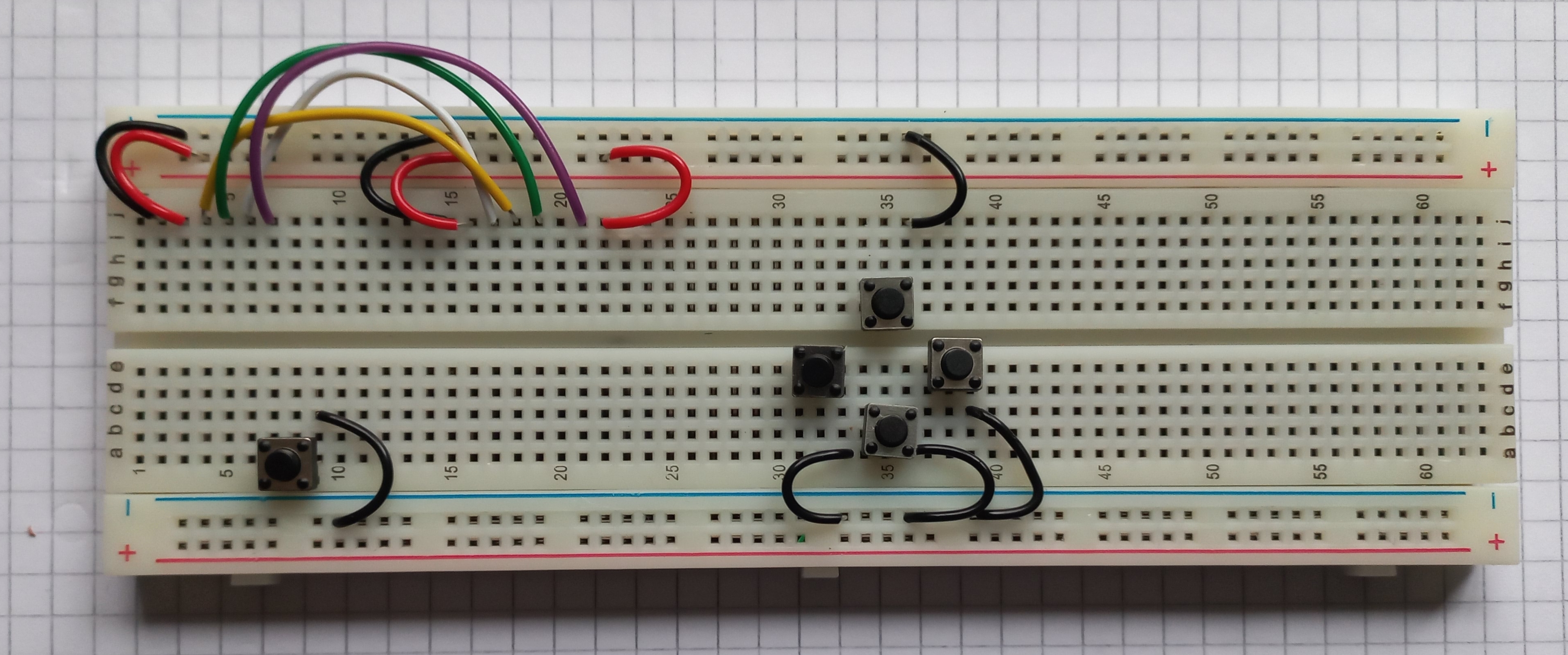
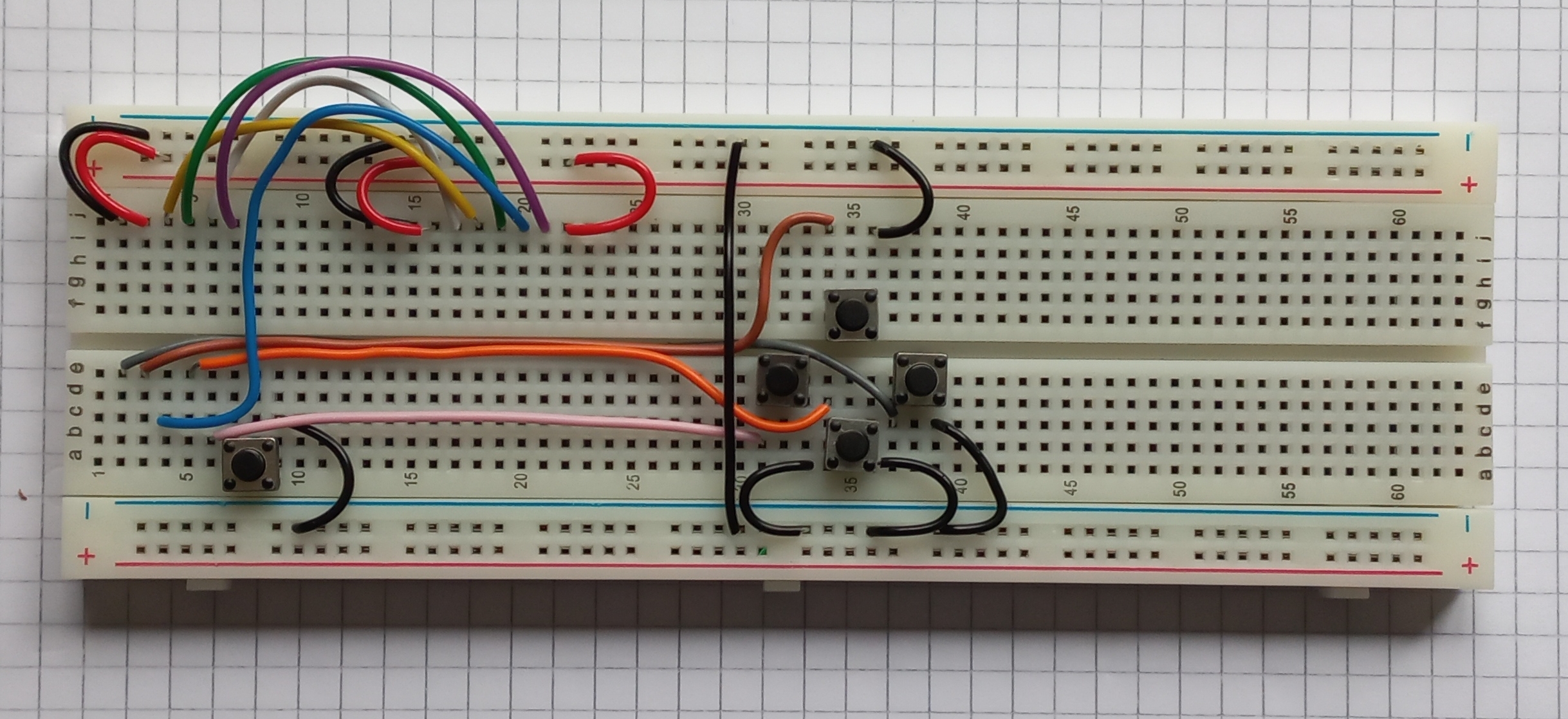
A set of construction images is shown below. Be careful to place the wires and components exactly as shown. The breadboard has rows labelled a to j and columents 1 to 63 which may help when inserting components. If you would like to know more about breadboards this video may help:

Construction image gallery

The following three images show the placement of the display wires and grounds on this board

The image below shows the placement of the gamepad wiring. Be sure to run the wires in the slot as shown. The left-most button is equivalent to the A button on a game controller. Its left pin lines up with a pin on the microcontroller development board so no wire is needed for it (apart from ground).

The long black and blue wires are shown below. Be careful to leave space for the microcontroller board when routing the blue wire.

The microcontroller boards is placed as shown. It fits in to the left-most holes of the breadboard.

The buzzer placement is shown below. One pin goes into the ground track of the breadboard, the other wire goes to the leftmost column of the breadboard just below the microcontroller board.

Finally, fit the display as shown below. Be careful to line up the pins with the wires as shown.

Programming

Our game console is programmed in Micropython which is best accessed using the Thonny development environment. There are three ready-made games which will hopefully help your learning of micropython and the hardware on our board. There is also a place for you to create your own game. When the board starts you are presented with a menu which allows you select from these (press A to select). There are lots of micropython and python learning resources on the Internet. The basics of Python can be studied here: https://www.w3schools.com/python/. Micropython tutorials tend to be board specific. A tutorial for our XIAO board can be found here: https://wiki.seeedstudio.com/XIAO-RP2040-with-MicroPython/. Board documentation is available here (check the rpi2040 chapter): https://files.seeedstudio.com/wiki/XIAO/Seeed-Studio-XIAO-Series-SOM-Datasheet.pdf

The code you will use in this exercise includes additionaly libraries to manage our specific hardware. This hardware includes the display, the buzzer, the various buttons and the onboard RGB led. Here is a list of the functions within these libraries.

Functions that control the display
putPixel(x,y,colour): lights up a display pixel with the specified location and colour
drawLine(x0,y0,x1,y1,colour): x0,y0 = start point, x1,y1 = end point
fillRectangle(x1,y1,w,h,colour): x1,y1 = top left corner, w=width, h=height
drawRectangle(x1,y1,w,h,Colour): x1,y1 = top left corner, w=width, h=height
clear(): clear the screen to black
putImage(x,y,w,h,img,horiz,vert): put image at x,y. Width is w, height is h. Image data is in img and h,v specify whether image is inverted in horizontal or vertical axes
setOrientation(h,v): set display orientation (0,0) = default
print(text, x, y, forecolour, backcolour): print text at x,y with foreground and background colours
drawCircle(x0,y0,radius,colour): circle with
fillCircle(x0,y0,radius,colour):
RGBToWord(r,g,b): convert 8 bit red, green and blue values to a 16 bit colour value

Functions that use the gamepad buttons
leftPressed(): returns 1 if the left button was pressed
rightPressed(): returns 1 if the right button was pressed
downPressed(): returns 1 if the down button was pressed
upPressed(): returns 1 if the up button was pressed
aPressed(): returns 1 if the A button was pressed
buttonPressed(): returns a bit patten for the various buttons (0 if nothing pressed)

Functions that manage sound
sound.tune.append() : append a note to the sound array
sound.note(frequency,duration,pause)

Sprite functions
sprite(x,y,w,h,image,display): creates at sprite with the initial position x,y. Bounding rectangle height=h,width=w
show(): show the sprite on screen
hide(): hide the sprite
move(newx, newy): move the sprite (erase at the previous location)
move_no_erase(newx, newy): move the sprite (don’t at the previous location)
setOrientation(horiz, vert): set sprite horizontal and vertical orientation (default 0,0)
isOverlapping(sprite2): do this sprite overlap another?

RGB Led support
set_colour(self,red,green,blue): light up the onboard LED with the particular color

Once you have finished building the board (and playing the games) we will explore how you might write your own game. Starter code for this event is available below:

The GD32E230

I came across some GD32E230K8T6 microcontrollers on Aliexpress. They contain an ARM Cortex M23 that can run up to 72MHz, 64kB of Flash and 8kB of RAM. They were on sale for 72c so I had to try them out. The ones I bought were the in an LQFP32 package which can be soldered fairly easily onto a breakout board as shown below.

Also shown in the image is a CMSIS adapter (from Aliexpress too!). To connect to the board I had to modify the openocd cmsis-dap.cfg file as follows:

adapter driver cmsis-dap
cmsis_dap_vid_pid 0xc251 0xf001
cmsis_dap_backend hid

Openocd can then be started as follows:

openocd -f cmsis-dap.cfg -f /usr/share/openocd/scripts/target/gd32e23x.cfg

Gigadevices provide a firmware library over here https://www.gd32mcu.com/en/download/7?kw=GD32E2

This covers all the basics (GPIO,ADC,SPI etc) however the directory layout didn’t suit my usual way of doing things so I restructured it a little so that programs could be built from the command line using a simple script.

Blinky


#include <stdint.h>
#include "system_gd32e23x.h"
#include "gd32e23x_gpio.h"
#include "gd32e23x_rcu.h"
void delay(uint32_t dly)
{
    while(dly--);
}
int main()
{
    SystemInit();  // system clock is set to 72MHz
    
    rcu_periph_clock_enable(RCU_GPIOA);
    gpio_deinit(GPIOA);
    gpio_mode_set(GPIOA,GPIO_MODE_OUTPUT,GPIO_PUPD_NONE,GPIO_PIN_0);

    while(1)
    {
        gpio_bit_set(GPIOA,GPIO_PIN_0);
        delay(1000000);
        gpio_bit_reset(GPIOA,GPIO_PIN_0);
        delay(1000000);
    }
}

This program uses some functions from the driver library provided by Gigadevices. For simplicity I placed all of the header and c-source files for this library in a higher level directory called include. The program can be built using the following command:

arm-none-eabi-gcc -mthumb -g3 -mcpu=cortex-m23 init.c main.c ../include/*.c -I ../include  -T linker_script.ld -o main.elf -nostartfiles 

This is not at all optimal as it compiles all the driver code every time and also makes the final executable bigger than it needs to be. However it is useful for getting started and the executable file size can be trimmed later if needs be.

The blinky program has two source files : main.c (above) and init.c. The second of these contains all of the interrupt vectors and global/static data initilization routines. This, along with another couple of examples can be found over on my github page.

Hands on Risc-V (RV32IMAC) assembler : Part 4

Making decisions

Up until now, the microprocessors I have dealt with made decisions using the following pattern:

compare A to B

branch if higher/lower/same etc to somewhere else

The compare instruction is similar to a subtraction however the result is not used but changes to the ALU flags are used to by the subsequent conditional branch instruction to determine whether the branch (jump) is taken or not. Comparison operands typically can be registers or (sometimes) an immediate values.

The RV32IMAC architecture executes the compare and conditional jump operation as a single instruction. Some examples are:

	beq t0,zero,jump2
	bne t0,zero,jump1
	
	blt t0,t1,jump1
	bltu t0,t1,jump2
	ble t0,t1,jump2
	bleu t0,t0,jump1
	
	bgt t0,t1,jump2
	bgtu t0,t0,jump1
	bge t0,t1,jump2
	bgeu t0,t0,jump1
	

Note that conditional branches work with registers only. The destination is a 12 bit signed relative offset expressed in two byte steps. In other words if this is 5 then the actualy offset is 10 bytes away. The first two comparisons above use the zero register in the CPU core as one of the operands. The u suffix on the conditional branch instructions indicates that an unsigned comparison is to be made.

Hands on Risc-V (RV32IMAC) assembler : Part 3

Arithmetic calculations

The code below shows addition, subtraction, multiplication and division. Immediate addition and subtraction are the same instruction ; you add a negative sign to the immediate value to perform subtraction. Immediate values are 12 bit signed so the range of values is -2048 to +2047.

Multiplying two 32 bit numbers requires two steps: the mul instruction produces the 32 bit low order word result. The mulh(u) insruction produces the 32 bit high order word result. The u suffix is used for unsigned multiplication.

32 bit division uses the div instruction while the rem instruction can be used to determine the remaind er of a division.

I have noticed some problems debugging this chip. Normally when you debug assembly language, the debugger shows you the line of code that will be executed next i.e. it hasn’t happened yet. I have noticed that this is not the case with this debugger and mcu. I suspect it is due to the instruction pipeline in the CPU behaving in way that is not expected by jlink and/or gdb. I have taken to (temporarily) adding nop instructions at various places to stop the CPU from getting ahead me.

/* Initialization routine which sets the stack pointer, 
 sets initial global values and clears those that are not
 specifically initialized.  Assumes that the linker script aligned 
 data sections along a word (4 byte) boundary.
*/
	.global Reset_Handler	
	
	.section start
Reset_Handler:
	lui sp,0x20005 # set stack pointer to top of RAM
	
	lui t2,%hi(a)		/* load 20 high bits of address of a into t2 */
	addi t2,t2,%lo(a)   /* add lower 12 bits of address of a to t2 */
	lw t0,0(t2) 		/* load the value pointed to by (0+t2) into t0 */
	
	lui t2,%hi(b)		/* load 20 high bits of address of b into t2 */
	addi t2,t2,%lo(b)	/* add lower 12 bits of address of b to t2 */
	lw t1,0(t2)			/* load the value pointed to by (0+t2) into t0 */	
	
	add t4,t0,t1        /* register to register addition */
	sub t5,t1,t0		/* register to register subtraction */
	
	add t4,t0,1			/* add immediate */
	add t5,t0,-1		/* subtract immediate */
	
	add t4,t0,2047		/* maximum immediate addition (12 bits signed) */
	add t5,t0,-2048		/* maximum immediate subtraction (12 bits signed) */
	
	lui t2,%hi(a)		/* load 20 high bits of address of a into t2 */
	addi t2,t2,%lo(a)   /* add lower 12 bits of address of a to t2 */
	lw t0,0(t2) 		/* load the value pointed to by (0+t2) into t0 */
	
	lui t2,%hi(b)		/* load 20 high bits of address of b into t2 */
	addi t2,t2,%lo(b)	/* add lower 12 bits of address of b to t2 */
	lw t1,0(t2)			/* load the value pointed to by (0+t2) into t0 */	
	
	mul t4,t0,t1		/* low order multiplication word */
	mulhu t5,t0,t1		/* high order multiplication word */
	
	lui t2,%hi(mul64)		/* load 20 high bits of address of mul64 into t2 */
	addi t2,t2,%lo(mul64)	/* add lower 12 bits of address of mul64 to t2 */
	sw t4,0(t2)				/* store the value in t4 to address pointed to by (0+t2) */
	sw t5,4(t2)				/* store the value in t5 to address pointed to by (4+t2) */
	
	lui t2,%hi(e)		/* load 20 high bits of address of e into t2 */
	addi t2,t2,%lo(e)   /* add lower 12 bits of address of e to t2 */
	lw t0,0(t2) 		/* load the value pointed to by (0+t2) into t0 */
	
	lui t2,%hi(f)		/* load 20 high bits of address of f into t2 */
	addi t2,t2,%lo(f)	/* add lower 12 bits of address of f to t2 */
	lw t1,0(t2)			/* load the value pointed to by (0+t2) into t0 */	
	
	divu t4,t0,t1		/* 32 bit division result	*/
	rem t5,t0,t1		/* 32 bit division remainder */
	
	lui t2,%hi(divresult)		/* load 20 high bits of address of mul64 into t2 */
	addi t2,t2,%lo(divresult)	/* add lower 12 bits of address of mul64 to t2 */
	sw t4,0(t2)				/* store the value in t4 to address pointed to by (0+t2) */
	sw t5,4(t2)				/* store the value in t5 to address pointed to by (4+t2) */
	
	nop /* 1 */
	nop /* 2 */
	nop /* 3 */
	nop /* 4 */
	nop /* 5 */
	nop /* 6 */
	nop /* 7 */
	nop /* 8 */
	nop /* 9 */
	
exit_spin: 
	j exit_spin
		
a:	.word 0x12345678
b:	.word 0x23456789
e:	.word 19
f:	.word 6


		.data
mul64:	.word 0,0
divresult:	.word 0
rem32:	.word 0


Hands on Risc-V (RV32IMAC) assembler : Part 2

Registers

The GD32VF103 has 32 CPU core registers (x0 to x31) each of which is 32 bits wide. There is also a 32 bit program counter (pc) (instruction pointer). Apart from x0 which is read-only and always returns a value of zero all the registers are interchangeable. This means that any register can be a stack pointer, a link register, an argument to a function and so on. While this freedom may seem great it could lead to chaos if you want pre-compiled program modules or libraries to work with one another. There must be some agreement between authors of such as to which registers carry return results, parameters, behave as a stack pointer and so on. The RISC-V Application Binary Interface (ABI) defines this and also renames the registers so that their use is more apparent. Assemblers and compilers are aware of these names also. The register names used in the RISC-V ABI are:

x0 is renamed to zero. This reminds me of the constant generator in the TIMSP430 which could output 6 different constant values that were commonly used in code. Using the zero register is faster than loading the value 0 from memory and is commonly used in program loops etc.

a0 to a7 : These are used to pass arguments to functions.

a0 and a1 are also used to return values from functions.

x2 is nominated as the Stack Pointer (sp)

x1 is used as a link register (it remembers the return address in leaf functions). It is called “ra” (return address). This is similar to the link register in ARM Cortex-M processors.

t0 to t6 are “temporary” registers. Functions need not preserve values in these registers

s0 to s11 are “saved” or “variable” registers. Functions must preserve values in these registers. They typically are used to hold a variable for quick access in a function (e.g. a loop counter).

x3 is renamed as gp (global pointer) and can be used to point at the middle of the global memory space

x4 is renamed as tp (thread pointer) is used in multi-threaded applications and points at a block of memory containing static data used by the current thread.

The mapping of these ABI register names to the underlying “x” register names may seem a little arbitrary. Presumably it is influenced by various efficiency constraints and the need to accommodate a version of the architecture which has only 16 registers (the “E” or embedded architecture). From a programmers perspective it makes no difference which underlying “X” register is used for each role so don’t worry too much about it!

In summary, the registers typically used by an application program are as follows:

t0-t6temporary or scratch registers
a0 to a7function arguments and return values
s0 to s11registers where you can keep variables inside a block of code. Register s0 is used as a frame pointer inside a function call.
spstack pointer
rareturn address for leaf functions
gpglobal pointer
tpthread pointer
zeroa register that always returns a value of zero.

How do I put a number in a register?

The GD32VF103 uses an RV32IMAC core. This means it does Integer calculations only. Has a hardware Multiply, is capable of certain Atomic (non-interruptible) instructions (useful for multitasking and interrupts) and it can execute Compressed (16 bit) instructions as well as 32 bit ones.

From a programmers point of view, it might be nice if we could write instructions like this:

1) Put this 32 bit number into this register.

2) Add 1 to this register.

3) Store this register at this 32 bit memory address.

4) Set this register to zero.

From a CPU design perspective these instructions are less than ideal. Instruction 1 must be more than 32 bits wide as it has to encode the instruction, the target register and the 32 bit value.

Instruction 2 could be easily encoded in 16 bits.

Instruction 3 is, once again, wider than 32 bits.

Instruction 4 could be encoded in 16 (or fewer) bits.

These variable length instructions cause problems for instruction pipelines and complicate the instruction fetch mechanism. It would be nicer if instructions were a fixed width e.g. 32 bits. If you have lots of memory then this is fine. In embedded situations, where memory is in short supply, this is quite wasteful. If all instructions occupy 32 bits then simpler instructions will include lots of unused bits. RISC-V and ARM designers have compromised on instruction size by processing a mix or 16 and 32 bit instructions. This allows more instructions to be packed into less memory and only slightly complicates the instruction fetch and pipeline hardware. In the case of RISC-V the 16 bit instructions are referred to as Compressed instructions (the “C” in RV32IMAC).

Ok, we have 32 bit and 16 bit instructions. How do we do instruction 1 above:

Put this 32 bit value into this register

You could do it in two halves and load the upper 16 bits followed by the lower 16 bits using two 32 bit instructions.

Or, you could execute a command of the following form:

Load the 32 bit value in memory that is N bytes away from here.

In the case of RISC-V, you can do the following:

Load the following 20 bits into the upper bits of this register (clearing the lower 12 bits)

Add the following 12 bit number. The programmer can write these two commands

lui t0,0x12345 /* load upper 20 bits */

addi t0,t0,0x678 /* add lower 12 bits */

This is further complicated by the fact that the addi instruction takes a signed value. If you need to add an immediate value whose 12th bit is set (implying a negative value) you have to figure out two’s compliment values and add what looks like a negative number. Recognizing that this is likely to lead to all sorts of human errors, a handy pseudo instruction is available: load immediate or li. This is translated by the assembler into the correct pair of lui and addi instructions. So, our load now goes like this:

li t0,0x12345678

The Load Store architecture.

All arithmetic and logical operations in the RV32IMAC are carried out via the cpu registers. It is not possible to add values in memory directly to one another : you need to get them into registers first (load), do the calculation and then optionally write (store) the result back to memory. Suppose you want to do the following calculation:

c = a + b;

Typically the process works like this:

Make a pointer to a.

Load the value at a into a register.

Make a pointer to b.

Load the value at b into a (different) register.

Add the two registers together.

Make a pointer to c.

Write the result to c.

The code shown below implements this (not particulary optimal).

	lui t2,%hi(a)		/* load 20 high bits of address of a into t2 */
	addi t2,t2,%lo(a)   /* add lower 12 bits of address of a to t2 */
	lw t0,0(t2) 		/* load the value pointed to by (0+t2) into t0 */
	
	lui t2,%hi(b)		/* load 20 high bits of address of b into t2 */
	addi t2,t2,%lo(b)	/* add lower 12 bits of address of b to t2 */
	lw t1,0(t2)			/* load the value pointed to by (0+t2) into t0 */
	
	add t0,t0,t1		/* add the values at a and b */
		
	lui t2,%hi(c)		/* load 20 high bits of address of c into t2 */
	addi t2,t2,%lo(c)	/* add lower 12 bits of address of c to t2 */
	sw t0,0(t2)			/* store the value in t0 to address pointed to by (0+t2)

exit_spin: 
	j exit_spin
/* constants below are in flash */	
a:	.word 0x12345678
b:	.word 0x23456789
/* variables are placed in ram */
	.data
c:	.word 0

Hands on Risc-V (RV32IMAC) assembler : Part 1

Setting up the development environment


I was looking around for a board to tinker with RV32 assembly language as a way of getting to know the architecture a bit better. I tried using a WCH-Link debugger module and a CH32VF103 board but so far I have had no success using OpenOCD with it. I have opted instead to use a Longan Nano GD32VF103 in conjunction with a J-Link Edu debugger. This worked well enough for me to get going although the debug interface appears to be very sensitive to noise.

Using the Jlink tools from Segger a GDB link to the target as follows:
JLinkGDBServer -device GD32VF103C8T6 -if JTAG

First code.

My goal here is to get started into RISC-V assembler with the minimum amount of fuss. When the Longan-Nano GD32VF103 boots it begins executing code at address 0. Typically this code would initialize global and static variables, set the stack pointer and then call on main. For this particular architecture it also needs to set up the interrupt controller. I will do this at a later time. For now I will work without interrupts.

/* init.s
 Initialization routine which sets the stack pointer, 
 sets initial global values and clears those that are not
 specifically initialized.  Assumes that the linker script aligned 
 data sections along a word (4 byte) boundary.
*/
	.global Reset_Handler
	.extern INIT_DATA_VALUES
	.extern INIT_DATA_START
	.extern INIT_DATA_END
	.extern BSS_START
	.extern BSS_END
	.extern main
	.section start
Reset_Handler:
	lui sp,0x20005 # set stack pointer to top of RAM
# Fill global and static variables with initial values
	la	t0,INIT_DATA_VALUES
	la  t1,INIT_DATA_START
	la  t2,INIT_DATA_END
init_data_store_loop:
	beq t1,t2,done_init_data
	lw  a0,0(t0)
	sw  a0,0(t1)
	addi t0,t0,4
	addi t1,t1,4
	j init_data_store_loop
done_init_data:
# Fill uninitialized global and static variables with zero
	la	t0,BSS_START
	la  t1,BSS_END
zero_data_store_loop:
	beq t0,t1,done_zero_data
	sw  x0,0(t1)	
	addi t0,t0,4
	j zero_data_store_loop
done_zero_data:
# call main C code
	jal main
main_exit_spin: /* should not get here. */
	j main_exit_spin

This code needs to be placed at address 0 (aliased from 0x08000000). The linker script helps do this by associating the section name “start” with the first entry in the flash ROM.

/* linker_script.ld */
/* useful reference: www.linuxselfhelp.com/gnu/ld/html_chapter/ld_toc.html */
/* sdata and sbss : the 's' prefix indicates short addressing (32 bit rather than 64 bit) is used */
MEMORY
{
    flash : org = 0x00000000, len = 64k
    ram : org = 0x20000000, len = 20k
}
  
SECTIONS
{
        
	. = ORIGIN(flash);
        .text : {
          *(start);
		  *(.vectors); /* The interrupt vectors */
		  *(.text);
		  *(.rodata);
		  *(.comment);		  
		
		  . = ALIGN(4);
        } >flash
	. = ORIGIN(ram);
        .data : {
	  INIT_DATA_VALUES = LOADADDR(.data);
	  INIT_DATA_START = .;
	    *(.data);
	    *(.sdata);
	  INIT_DATA_END = .;
	  . = ALIGN(4);
        } >ram AT>flash
	BSS_START = .;
	.bss : {	  
	    *(.bss);
	    *(.sbss);
	    . = ALIGN(4);
	} > ram
	BSS_END = .;
}

/* main.c */
int x=0x12345678;
int y=0xabcd1234;
int z;
int main()
{
	
	y += 5;
	z = 4;
	while(1)
	{
		x+=y;
	}
}

The following command compiles the code:

riscv64-unknown-elf-gcc -march=rv32imac -mabi=ilp32 main.c init.s -nostdlib -T linker_script.ld -g3 -O0

The -march parameter is set to rv32imac which matches the gd32vf103. The mabi argument generates code with the following integer and pointer sizes:

long : 64 bits, int : 32 bits, short : 16 bits, pointers : 32 bits

(ref : https://www.sifive.com/blog/all-aboard-part-1-compiler-args)

There are two files in this project : main.c (a simple C program) and init.s.

The nostdlib argument really says that this is a completely bare-metal program that requires no additional components.

The linker script file name is specified with the -T argument.

The -g3 argument turns debugging information up to the maximum which helps debugging

The -O0 argument turns off all optimizations so that the code is left “as is”.

Debug session

Execute the following command to start the debug session (assuming you have started the JLinkGDBServer in another window).

gdb-multiarch a.out  

This starts the following GDB session.
GNU gdb (Ubuntu 13.1-2ubuntu2) 13.1
Copyright (C) 2023 Free Software Foundation, Inc.
License GPLv3+: GNU GPL version 3 or later <http://gnu.org/licenses/gpl.html&gt;
This is free software: you are free to change and redistribute it.
There is NO WARRANTY, to the extent permitted by law.
Type “show copying” and “show warranty” for details.
This GDB was configured as “x86_64-linux-gnu”.
Type “show configuration” for configuration details.
For bug reporting instructions, please see:
<https://www.gnu.org/software/gdb/bugs/&gt;.
Find the GDB manual and other documentation resources online at: <http://www.gnu.org/software/gdb/documentation/&gt;.

For help, type “help”.
Type “apropos word” to search for commands related to “word”…
Reading symbols from a.out…
(gdb) target ext :2331
Remote debugging using :2331
main () at main.c:12
12 x+=y;
(gdb) monitor reset
Resetting target
(gdb) load
Loading section .text, size 0x9c lma 0x0
Loading section .data, size 0x8 lma 0x9c
Start address 0x00000000, load size 164
Transfer rate: 160 KB/sec, 82 bytes/write.
(gdb) stepi
Reset_Handler () at init.s:17
17 la t0,INIT_DATA_VALUES
(gdb) i r
ra 0x0 0x0 <Reset_Handler>
sp 0x20005000 0x20005000
gp 0x0 0x0 <Reset_Handler>
tp 0x0 0x0 <Reset_Handler>
t0 0x0 0
t1 0x0 0
t2 0x0 0
fp 0x0 0x0 <Reset_Handler>
s1 0x0 0
a0 0x0 0
a1 0x0 0
a2 0x0 0
a3 0x0 0
a4 0x0 0
a5 0x0 0
a6 0x0 0
a7 0x0 0
s2 0x0 0
s3 0x0 0
s4 0x0 0
s5 0x0 0
s6 0x0 0
s7 0x0 0
s8 0x0 0
s9 0x0 0
s10 0x0 0
s11 0x0 0
t3 0x0 0
t4 0x0 0
t5 0x0 0
t6 0x0 0
pc 0x4 0x4 <Reset_Handler+4>

Commands that are entered are shown in bold in the above listing. The first of these is

target ext :2331

This connects to the JLinkGDBServer over TCP port 2331 on the local machine

monitor reset

This resets (and halts in this case) the GD32VF103

load

Loads the program specified in the command line (a.out) into flash memory

stepi

Execute a single assembler instuction pointed to by the the program counter (pc)

i r

Shorthand for info registers. This displays the contents of the CPU registers.

Now that all of this seems to be working further adventures in RISC-V assembler will follow.

Mystery micro Monday

The microcontroller pictured above is a curiosity. It is labelled STM32F0C8T6 and it is in an LQFP-32 package. According to ST’s datasheet, the STM32F0C8 is an LQFP-48 device so this chip should not exist. Suspecting a forgery I soldered it to a breakout board and investigated using openocd. It turns out that this is a mis-labelled STM32F0K6T6 with 4kB of RAM and 32kB of flash. Other than the faulty label it appears to be fine. Counterfit or factory reject? Who knows?