STM32L011 serial, analog and low power examples

Here are some further examples for the STM32L011 Nucleo board. The first is a simple interrupt driven serial communications demonstration. It makes use of the built in serial interface in the Nucleo board and so no additional hardware is required for your host PC to exchange data with the MCU.
The second example builds on the first. It reads ADC channel 0 and outputs the result to the host PC over the serial port.
The third example is a little more elaborate and is aimed at those wishing to develop a very long life battery application. It uses the built-in real-time-clock (RTC) to wake the MCU up about once every second. While awake, the MCU reads the ADC, outputs data to the host PC over the serial port and blinks the LED on the Nucleo board. Current consumption is minimized during sleep by turning off
peripherals, reducing AHB clock speed and putting the Cortex M0+ into a deep sleep. I found it difficult to measure the current flow during this time but it seems to be around 3 to 4 microamps. One thing I did notice is that the CPU will not go to sleep with interrupts disabled – a good way of preventing you from shooting yourself in the foot.

Links to code.

Serial communications over the nucleo serial interface to the host PC
Read the ADC and output the result over the serial port to the host PC
Minimize power consumption and wake using the internal RTC every second

Blinky on the STM32L011 Nucleo

The STM32L011 Nucleo board is an mbed enabled development kit featuring the STM32Lo11K4 MCU. This is a Cortex M0+ device with some interesting features such as hardware accelerated AES encryption (Correction: AES not present on the STM32L011) and a “Firewall” which seems to prevent firmware and other data being offloaded from the device. The board is meant to be programmed with a large IDE or using the mbed online development environment. I was curious to see could it be done from the command line with all code contained in a single directory. Normally I would tackle this with OpenOCD and GDB but this is such a new board that OpenOCD/GDB can’t interface with it properly (yet). All is not lost however! The mbed feature of this board means that it appears as a removable storage device to the operating system. Programming the board is simply a matter of dropping a correctly formatted executable (binary) file into this removable storage device. The utility objcopy can be used to prepare the executable file.
Assuming you have compiled your code to an “elf” file called main.elf, you can generate a binary file as follows:
objcopy -O binary main.elf main.bin
The “bin” file can be dropped on the Nucleo and should run fine.
Code for blinky is available here

Analog pass-through using the MSP432 Launchpad and Energia

UPDATE!


3rd of March 2018
The code in this example has been updated. See here:
https://wordpress.com/post/ioprog.com/1628

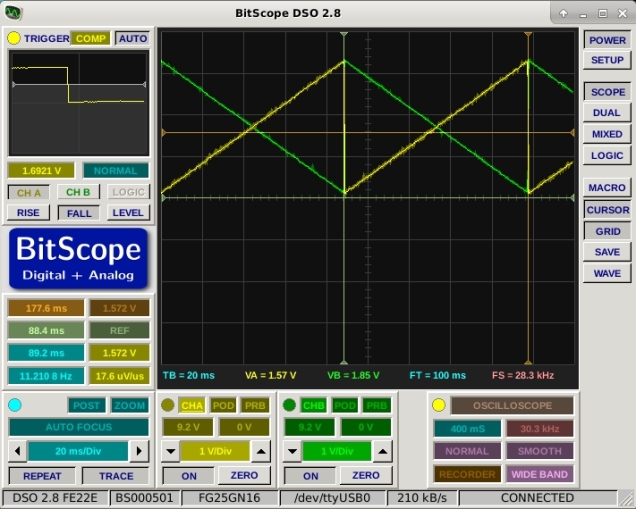
This example combines two previous posts regarding the TLV5618 DAC and timer interrupts with the MSP432 Launchpad.  The project reads the A0 analog input at 22050Hz (half CD quality) and outputs the reading  via the TLV5618 Channel A DAC.  Higher sample rates are possible but an error creeps in due to overhead handling the DAC.  This example also corrects an error in the previous post about timer interrupts which assumed that the timer base frequency was 16MHz – it seems to be 12MHz in fact.  The output for a 1kHz sinewave is shown below.

MSP432_PassThrough

The code is here.

// This program does an analog pass through between Analog input A0 (P5.5)
// on the MSP432 Launchpad and a TLV5618 SPI DAC.
// The green LED is used to indicate that the program is still alive :o)
// Further details at ioprog.com

#include 
#include 
#include 
#include 
#define SS_PIN 17
void setup()
{ 
  // put your setup code here, to run once:
  pinMode(SS_PIN,OUTPUT);
  pinMode(15,OUTPUT); // MOSI
  pinMode(7,OUTPUT); // SCK
  SPI.setModule(EUSCI_B0_MODULE); // Select correct SPI interface
  SPI.setDataMode(SPI_MODE2);
  SPI.setBitOrder(MSBFIRST);   
  SPI.setClockDivider(SPI_CLOCK_DIV2); // DIV2 = 8MHz, DIV4 = 4MHz, DIV8 = 2MHz etc. (from measurement)
  UCB0CTLW0 &= ~(BIT0); // Take SPI out of reset   
  pinMode(BLUE_LED,OUTPUT);
  pinMode(GREEN_LED, OUTPUT);
  setupTimer(1000000/22050); // Set sample frequency to 22050 : Period=(1000000 microseconds / desired sample rate)
  analogReadResolution(12); // set the ADC resolution to 12 bits (match the DAC)
}


void loop()
{ // Nothing happens here: it is all interrupt driven - see OnTimer for main processing code.
}
void OnTimer()
{
 
  writeDACA(analogRead(A0)); // write out what is coming in on A0
  // The following simply flashes the green LED to show the program is still running
  static int Count = 0;
  static int state = 0;
  Count++;
  if (Count > 22050)
  {
    Count = 0;
    digitalWrite(GREEN_LED,state);
    if (state)
      state = 0;
    else
      state = 1;
  }

}

void writeDACA(int Value)
{
  Value=Value & 0xfff;
  Value = Value | 0xc000; // Write DAC A
  digitalWrite(SS_PIN,LOW); // Drive CS low
  UCB0TXBUF=( (Value >> 8) & 0xff); // write high byte
  while(UCB0STATW & BIT0); // wait while SPI busy
  UCB0TXBUF=  ( Value  & 0xff); // write low byte
  while(UCB0STATW & BIT0); // wait while SPI busy
  digitalWrite(SS_PIN,HIGH); // Drive CS High
}
void writeDACB(int Value)
{
  Value=Value & 0xfff;
  Value = Value | 0x4000; // Write DAC B value to buffer and update
  digitalWrite(SS_PIN,LOW); // Drive CS low
  UCB0TXBUF=( (Value >> 8) & 0xff); // write high byte
  while(UCB0STATW & BIT0); // wait while SPI busy
  UCB0TXBUF=  ( Value  & 0xff); // write low byte
  while(UCB0STATW & BIT0); // wait while SPI busy
  digitalWrite(SS_PIN,HIGH); // Drive CS High
}
void writeDACs(int AValue, int BValue)
{
  
  // Write both DACs and update outputs simultaneously.
  BValue=BValue & 0xfff;
  BValue = BValue | 0x5000; // Write DAC B value to buffer 
  digitalWrite(SS_PIN,LOW); // Drive CS low
  UCB0TXBUF=( (BValue >> 8) & 0xff); // write high byte
  while(UCB0STATW & BIT0); // wait while SPI busy
  UCB0TXBUF=  ( BValue  & 0xff); // write low byte
  while(UCB0STATW & BIT0); // wait while SPI busy
  digitalWrite(SS_PIN,HIGH); // Drive CS High
  digitalWrite(SS_PIN,LOW); // Drive CS low
  AValue=AValue & 0xfff;
  AValue = AValue | 0xc000; // Write DAC A and update B
  digitalWrite(SS_PIN,LOW); // Drive CS low
  UCB0TXBUF=( (AValue >> 8) & 0xff); // write high byte
  while(UCB0STATW & BIT0); // wait while SPI busy
  UCB0TXBUF=  ( AValue  & 0xff); // write low byte
  while(UCB0STATW & BIT0); // wait while SPI busy
  digitalWrite(SS_PIN,HIGH); // Drive CS High

}
volatile uint32_t millisecondCounter=0;
int count = 0;
volatile int state = HIGH;
volatile int flag = HIGH;
void setupTimer(unsigned Period)
{
 
  // Configuration word
  // Bits 15-10: Unused
  // Bits 9-8: Clock source select: set to SMCLK (12MHz)
  // Bits 7-6: Input divider: set to 4
  // Bits 5-4: Mode control: Count up to TACCRO and reset
  // Bit 3: Unused
  // Bits 2: TACLR : set to initially clear timer system
  // Bit 1: Enable interrupts from TA0
  // Bit 0: Interrupt (pending) flag : set to zero (initially)
  TA3CTL=0b0000001010010110;
  TA3CCR0=Period*3; // Set TACCR0 = Period (3MHz clock)
  TA3CCTL0=BIT4; // Enable interrupts when TAR = TACCR0
// The following places the address of our interrupt service routine in the RAM based interrupt vector table
// The vector number is 14 + 16  = 30 which is represented by the symbol INT_TA3_0
  Interrupt_registerInterrupt(INT_TA3_0,timerA3ISR); 
 
  // according to the datasheet Table 6-12 timer A3 is on ISR 14
  NVIC_ISER0 = (1<<14); // enable this interrupt in the NVIC
 
}
 
void timerA3ISR(void)
{
  TA3CTL &= ~1;         // Acknowledge the interrupt
  TA3CCTL0 &= ~1;       // Acknowledge the interrupt
  NVIC_ICPR0 = (1<<14); // clear interrupt pending flag in NVIC
  millisecondCounter++;
  OnTimer();
}

Speedier DACs with the MSP432 Launchpad

UPDATE!


3rd of March 2018
The code in this example has been updated. See here:
https://wordpress.com/post/ioprog.com/1628

In an earlier post I showed how a TLV5618 dual DAC could be interfaced to an MSP432 Launchpad.  This worked OK but it was a bit slow.  The code below drives the DAC’s much faster as it uses direct register writes to the SPI interface.  The Energia SPI library is used to configure the interface. A single DAC channel can be driven at just over 100kHz; while a pair of channels can be updated at approx 48kHz – good enough for decent audio.


// This program drives a TLV5618 dual DAC
// It outputs sawtooth waveforms on both channels
// Output update frequency (both channels) is about 48kHz which
// is sufficient for decent quality audio.
// A single channel can be driven at more than 100kHz.
#include 
#include 
#define SS_PIN 17
void setup()
{
  // put your setup code here, to run once:
  pinMode(SS_PIN,OUTPUT);
  pinMode(15,OUTPUT); // MOSI
  pinMode(7,OUTPUT); // SCK
  SPI.setModule(EUSCI_B0_MODULE); // Select correct SPI interface
  SPI.setDataMode(SPI_MODE2);
  SPI.setBitOrder(MSBFIRST);
  SPI.setClockDivider(SPI_CLOCK_DIV2); // DIV2 = 8MHz, DIV4 = 4MHz, DIV8 = 2MHz etc. (from measurement)
  UCB0CTLW0 &= ~(BIT0); // Take SPI out of reset
}
void writeDACA(int Value)
{
  Value=Value & 0xfff;
  Value = Value | 0xc000; // Write DAC A
  digitalWrite(SS_PIN,LOW); // Drive CS low
  UCB0TXBUF=( (Value >> 8) & 0xff); // write high byte
  while(UCB0STATW & BIT0); // wait while SPI busy
  UCB0TXBUF=  ( Value  & 0xff); // write low byte
  while(UCB0STATW & BIT0); // wait while SPI busy
  digitalWrite(SS_PIN,HIGH); // Drive CS High
}
void writeDACB(int Value)
{
  Value=Value & 0xfff;
  Value = Value | 0x4000; // Write DAC B value to buffer and update
  digitalWrite(SS_PIN,LOW); // Drive CS low
  UCB0TXBUF=( (Value >> 8) & 0xff); // write high byte
  while(UCB0STATW & BIT0); // wait while SPI busy
  UCB0TXBUF=  ( Value  & 0xff); // write low byte
  while(UCB0STATW & BIT0); // wait while SPI busy
  digitalWrite(SS_PIN,HIGH); // Drive CS High
}
void writeDACs(int AValue, int BValue)
{

  // Write both DACs and update outputs simultaneously.
  BValue=BValue & 0xfff;
  BValue = BValue | 0x5000; // Write DAC B value to buffer
  digitalWrite(SS_PIN,LOW); // Drive CS low
  UCB0TXBUF=( (BValue >> 8) & 0xff); // write high byte
  while(UCB0STATW & BIT0); // wait while SPI busy
  UCB0TXBUF=  ( BValue  & 0xff); // write low byte
  while(UCB0STATW & BIT0); // wait while SPI busy
  digitalWrite(SS_PIN,HIGH); // Drive CS High
  digitalWrite(SS_PIN,LOW); // Drive CS low
  AValue=AValue & 0xfff;
  AValue = AValue | 0xc000; // Write DAC A and update B
  digitalWrite(SS_PIN,LOW); // Drive CS low
  UCB0TXBUF=( (AValue >> 8) & 0xff); // write high byte
  while(UCB0STATW & BIT0); // wait while SPI busy
  UCB0TXBUF=  ( AValue  & 0xff); // write low byte
  while(UCB0STATW & BIT0); // wait while SPI busy
  digitalWrite(SS_PIN,HIGH); // Drive CS High

}
int i=0;
void loop()
{
  // put your main code here, to run repeatedly:
  while(1)
  {
    writeDACs(i,0xfff-i);
    i++;
    if (i > 0xfff)
      i = 0;
  }
}

The output is shown below

dualdacsawtooth

Periodic interrupts with Energia and the MSP432 Launchpad

UPDATE!


3rd of March 2018
The code in this example has been updated. See here:
https://wordpress.com/post/ioprog.com/1628

Correction on 25th July 2016: Base clock for timer was wrong in original – now fixed.

In a previous post I showed how a periodic interrupt could be generated with the MSP430 Launchpad.  This post shows how it can be done using Energia and the MSP432 (ARM Cortex M4F) Launchpad.  The example uses Timer A3 to generate a periodic (1 kHz) interrupt.  There appears to be some interplay between this and the built-in delay routine however the delayMicroseconds function seems to work fine.  A global counter variable is updated at each interrupt so software can use this to perform additional time delays etc.

Some use is made of lower level library functions that are included with the Energia environment.  This example was compiled with Energia 0101E0017.

/* Periodic interrupt example for the MSP432 development board and the energia development environment */
/* The function OnTimer is called every millisecond and flashes the green LED every second
   The main loop flashes the blue LED every second
   Timer A3 is used to generate the interrupt
*/
 
#include ;
#include 
#include 
 
/*
General notes: serial comms uses eusci_a
PWM uses Timer A0 (at least I think so)
The built-in delay function appears not to work if it expires at the same time as a timer interrupt
The delayMicroseconds appears not to be so affected (so far)
*/
volatile uint32_t millisecondCounter=0;
int count = 0;
volatile int state = HIGH;
volatile int flag = HIGH;
 
void setup()
{
  Serial.begin(9600);
 
  pinMode(BLUE_LED,OUTPUT);
  pinMode(GREEN_LED, OUTPUT);
  setupTimer(1000); // set timer period to 1000 micro seconds
}
 
void OnTimer()
{
 
  static int Count = 0;
  static int state = 0;
  Count++;
  if (Count > 1000)
  {
    Count = 0;
    digitalWrite(GREEN_LED,state);
    if (state)
      state = 0;
    else
      state = 1;
  }
}
void loop()
{
 
  digitalWrite(BLUE_LED,HIGH);
  delayMicroseconds(500000);
  digitalWrite(BLUE_LED,LOW);
  delayMicroseconds(500000);
  Serial.println(millisecondCounter);
}
 
void setupTimer(unsigned Period)
{
 
  // Configuration word
  // Bits 15-10: Unused
  // Bits 9-8: Clock source select: set to SMCLK (12MHz)
  // Bits 7-6: Input divider: set to 4
  // Bits 5-4: Mode control: Count up to TACCRO and reset
  // Bit 3: Unused
  // Bits 2: TACLR : set to initially clear timer system
  // Bit 1: Enable interrupts from TA0
  // Bit 0: Interrupt (pending) flag : set to zero (initially)
  TA3CTL=0b0000001010010110;
  TA3CCR0=Period*3; // Set TACCR0 = Period (3MHz clock)
  TA3CCTL0=BIT4; // Enable interrupts when TAR = TACCR0
// The following places the address of our interrupt service routine in the RAM based interrupt vector table
// The vector number is 14 + 16  = 30 which is represented by the symbol INT_TA3_0
  Interrupt_registerInterrupt(INT_TA3_0,timerA3ISR); 
 
  // according to the datasheet Table 6-12 timer A3 is on ISR 14
  NVIC_ISER0 = (1<<14); // enable this interrupt in the NVIC
 
}
 
void timerA3ISR(void)
{
  TA3CTL &= ~1;         // Acknowledge the interrupt
  TA3CCTL0 &= ~1;       // Acknowledge the interrupt
  NVIC_ICPR0 = (1<<14); // clear interrupt pending flag in NVIC
  millisecondCounter++;
  OnTimer();
}


Adding a DAC to the MSP432 Launchpad

UPDATE!


3rd of March 2018
The code in this example has been updated. See here:
https://wordpress.com/post/ioprog.com/1628

The MSP432 Launchpad features quite a powerful low energy processor (the MSP432P401R).  This should make it ideal for a little DSP but for one problem: there is no DAC.  I decided that I should remedy this by adding an SPI DAC in the form of a TLV5618A. This 12-bit IC has two DAC outputs and can be driven at a speed sufficient for some pretty decent audio.  Wiring is as shown below:

wiring

Code was developed in Energia – an experience that left me wondering about the completeness and documentation of the MSP432 port to this environment.


#include 
#include 
#define SS_PIN 17
void setup()
{
  // put your setup code here, to run once:
  pinMode(SS_PIN,OUTPUT);
  pinMode(15,OUTPUT); // MOSI
  pinMode(7,OUTPUT); // SCK
  SPI.setModule(EUSCI_B0_MODULE);
  SPI.setDataMode(SPI_MODE1);
  SPI.setBitOrder(MSBFIRST);   //
  SPI.setClockDivider(SPI_CLOCK_DIV2); // DIV2 = 8MHz, DIV4 = 4MHz, DIV8 = 2MHz etc. (from measurement)
}
void writeDACA(int Value)
{
  Value=Value & 0xfff;
  Value = Value | 0xc000; // Write DAC A
  digitalWrite(SS_PIN,LOW);
  SPI.transfer( (Value >> 8) & 0xff);
  SPI.transfer( Value  & 0xff);
  digitalWrite(SS_PIN,HIGH);
}
int i=0;
void loop()
{
  // put your main code here, to run repeatedly:
  while(1)
  {
    writeDACA(i);
    i++;
    if (i > 0xfff)
      i = 0;
  }

}

This produces the following output waveform:

waveform

This is a little noisy but more to the point : SLOW!  The pair of SPI writes are taking more than 70 microseconds which makes me wonder about the efficiency of the underlying libraries.  I hope to remedy this in a later post (Edit: you can read about this here: https://ioprog.com/2016/07/02/speedier-dacs-with-the-msp432-launchpad/)

Disco Fever!

I have been working on a spectrum analyzer based on the STM32F303 Nucleo.  The analyzer uses a 16 LED WS2812B led ring to output spectrum data.  There were lots of interesting things on the way.

First of all, it seems that there are times when you should use gcc as your linker rather than ld.  It would appear that there are lots of options and switches built into gcc which it quietly passes on to the linker.  This tripped me up when specifying floating point options and specifying the FPU type.  After LOTS of fiddling and searching of mailing lists the problem was solved and the Makefile contains the necessary switches for the FPU and floating point libraries to all work together.

During the course of this project I tried to use the CMSIS fft functions – after all, they are optimized for ARM by ARM.  Sadly this didn’t work out because the 64k for flash memory in the STM32F303 isn’t big enough apparently.  I reverted to an fft function I’ve been using for years now on other MCU’s.  Its a lot smaller and executes quickly enough : the signal processing time for 512 samples is about 8.5ms.

Finally, the last hurdle to be overcome involved the WS2812B’s.  In a previous post I described the use of the STM32F042 with the WS2812 ring.  This MCU runs at 48MHz making it easy to generate a 3MHz SPI bus frequency : just divide by 16.  The STM32F303 however runs at 64MHz and only certain divisors are available (8/16/32 etc).  Initially I tried running the SPI at 2MHz and this worked for one or two LED’s however it did not work well for 16.  4MHz was then tried and its seems its ok although there is some flicker with certain combinations of LED colours.

The circuit.

Wiring


The video

The video below shows the STM32F303 performing a live FFT and controlling a WS2812 LED ring. The LED ring is driven as follows:
At the 6 o’clock position is low frequency. As you move anti-clockwise around the ring, each LED represents a higher frequency component.  Each LED represents a step of 128Hz so 2048Hz is the maximum frequency shown.  The system samples at 32768Hz however most of the music energy is at the lower end of the spectrum.  The LED ring is showing a “zoomed in” version of the spectrum

The LED colours change as follows (16 steps):
Blue : low magnitude
Yellow-Green : medium magnitude
Red : large magnitude


The music is from the Free Music Archive.  The track is Pianoman Sofa by Lobo Loco.


The code

The code is available on github at the link below.

https://github.com/fduignan/DiscoFever.git


The Nucleo ST-Link reflashed as a J-Link debugger

ST Microelectronics recently announced that the ST-Link debug interfaces on their boards can be reprogrammed as Segger/J-Link interfaces.  Curious, I flashed the firmware on to such a debugger as directed here https://www.segger.com/jlink-st-link.html .

I then wired the debugger to an stm32f030 as shown in the pictures below (the debugger had been snapped off the Nucleo board because the target MCU had been damaged)
JLink_stm32f030_2

JLink_stm32f030_1

The SWD connections are taken from CN4 and joined to the corresponding pins on the STM32F030.  Note the way the 3.3V is taken from the top of the jumper JP1:  The jumper must remain in place to power the debug interface.

Important: The Boot0 pin must be pulled to ground with a resistor or the CPU will boot to ISP mode and you won’t be able to run your test program.

In addition to the SWD connections, the STM32F030’s UART is connected to the TX and RX pins on the debug interface.  This allows an application running on the STM32F030 to send data to the host PC.

All of this was done in Ubuntu Linux using OpenOCD.  The OpenOCD configuration script (tbrd.cfg) is shown below:


# This is for the STM32F030 connected to the ST-Link Nucleo
# programmer that has been reflashed with the J-Link firmware

source [find interface/jlink.cfg]
transport select swd
source [find target/stm32f0x.cfg]
adapter_khz 1000

reset_config srst_nogate

The debug arrangement worked well: programs loaded quickly, registers could be examined and breakpoints set etc.

To run openocd type the following:

sudo openocd -f tbrd.cfg

In a new terminal window, run arm-none-eabi-gdb

The transcript for a simple session is shown below.

GNU gdb (GNU Tools for ARM Embedded Processors) 7.10.1.20160923-cvs
Copyright (C) 2015 Free Software Foundation, Inc.
License GPLv3+: GNU GPL version 3 or later <http://gnu.org/licenses/gpl.html>
This is free software: you are free to change and redistribute it.
There is NO WARRANTY, to the extent permitted by law.  Type "show copying"
and "show warranty" for details.
This GDB was configured as "--host=i686-linux-gnu --target=arm-none-eabi".
Type "show configuration" for configuration details.
For bug reporting instructions, please see:
<http://www.gnu.org/software/gdb/bugs/>.
Find the GDB manual and other documentation resources online at:
<http://www.gnu.org/software/gdb/documentation/>.
For help, type "help".
Type "apropos word" to search for commands related to "word".
(gdb) target remote :3333
Remote debugging using :3333
0x00000000 in ?? ()
(gdb) monitor reset halt
target state: halted
target halted due to debug-request, current mode: Thread 
xPSR: 0xc1000000 pc: 0x080000b4 msp: 0x20001000
(gdb) load main.elf
Loading section .text, size 0x328 lma 0x8000000
Start address 0x8000000, load size 808
Transfer rate: 3 KB/sec, 808 bytes/write.
(gdb) continue 
Continuing.


Using SPI and DMA to drive 3 WS2812Bs with an STM32F042 Nucleo

As promised in a previous post, this example drives 3 WS2812B’s using DMA to SPI.  It also shows that interrupts can happen at the same time without affecting the performance of the LED’s.

IMG_20160409_213853729

Three LED’s are controlled and, as expected, the burst of SPI data lasts 72 microseconds.

SPIDMAWaveform

The program outputs a simple RGB pattern that moves across the LED’s.  The program is deliberately slowed down to allow us see the changing colours.  The program also outputs a message over the UART to the host PC using an interrupt driven serial transmit routine which demonstrates that the solution is tolerant of interrupts.

A video of the program in action is over on YouTube.

Code may be downloaded over here on Github